Create a photorealistic Indian Raksha Bandhan celebration using the uploaded person(s) as the exact identity reference. Preserve their face, skin tone, hairstyle, body proportions, and natural features accurately.

If one person is uploaded, show them naturally participating in a Raksha Bandhan moment with an Indian sibling, with the uploaded person as the main subject. If two people are uploaded, use both as siblings in the same scene.

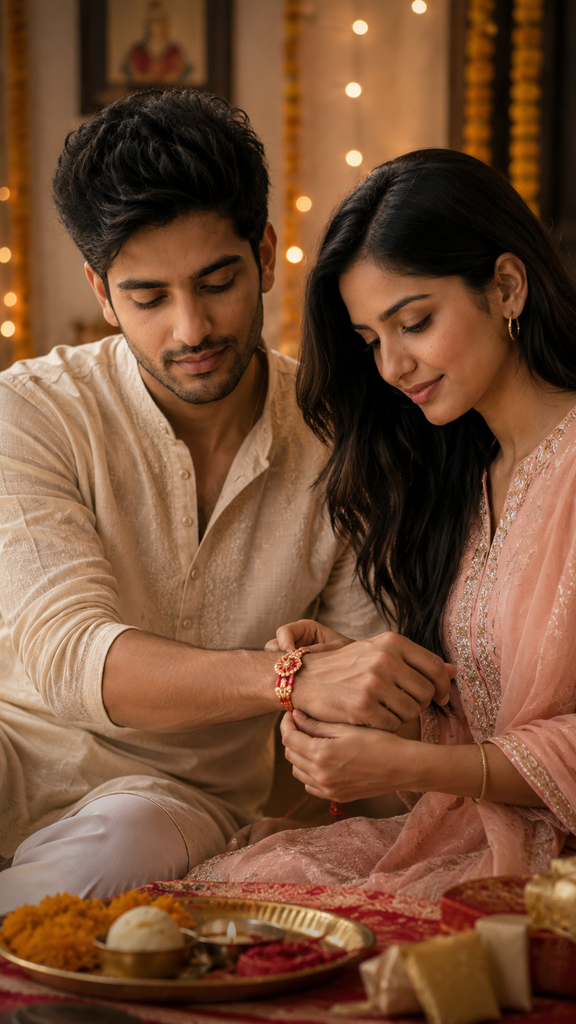
Show the sister lovingly tying a traditional Rakhi on the brother’s wrist, with a warm emotional sibling bond, subtle smiles, authentic Indian ethnic outfits, elegant traditional decor, soft festive lighting, and a natural family atmosphere.

Image format: vertical 9:16 aspect ratio, optimized for Instagram Reels (1080 × 1920).

Ultra-realistic photography, cinematic composition, realistic skin texture, authentic Indian details, premium lifestyle editorial look, high detail, 4K.
Raksha Bandhan is one of those occasions where a simple photograph can hold a lot of emotion. A brother and sister tying a rakhi, sharing a smile, or sitting together during the celebration instantly brings back family memories. With the Raksha Bandhan AI Photo Generator, you can turn an ordinary portrait into a festive sibling moment while keeping the uploaded person’s identity recognizable and natural.
A Warm, Festive Look
The visual direction works best as a photorealistic Indian lifestyle photograph, rather than an overly polished studio portrait. Traditional Raksha Bandhan details such as a decorated thali, colorful rakhis, ethnic clothing, flowers, and subtle home decorations help establish the occasion without making the scene feel artificial.
The mood is affectionate and celebratory. Soft expressions, natural body language, and the small interaction between siblings are more important than exaggerated smiles. The finished image should feel like a genuine family photograph captured during the festival.
Details That Make the Scene Convincing
One important choice is the camera perspective. A natural eye-level or slightly intimate portrait angle allows the rakhi-tying moment to remain the visual focus while still showing enough of the surrounding festive environment.
Lighting also plays a major role. Warm indoor illumination, gentle window light, or a combination of both can give the scene a welcoming Indian-home atmosphere. Harsh artificial lighting tends to make skin and traditional clothing look less realistic.
Another useful detail is the balance between festival colors and realistic skin tones. Reds, saffron, gold, pink, and green can appear through clothing and decorations, while the faces remain naturally rendered. That contrast keeps the photograph festive without turning it into a heavily edited poster.
Make It Your Own
There are several easy ways to personalize the generated scene:
- Use a traditional family setting: Place the siblings in a decorated living room, near a small puja area, or beside a festive doorway with flowers and torans.
- Change the sibling dynamic: Instead of only showing the rakhi being tied, try a moment where the brother is receiving the blessing, holding a gift, or sharing a playful smile with his sister.
- Match the clothing to your family style: A woman in a colorful saree or salwar suit and a man in a kurta can create a distinctly festive appearance, while simpler ethnic outfits give the image a more casual family-photo feel.
If you’re uploading two photos, using both people as sibling references can make the result particularly personal. With one uploaded portrait, the generator can place that person naturally into the Raksha Bandhan scene alongside an AI-generated sibling.
Where This Image Works Best
These Raksha Bandhan images are useful for Instagram and Facebook festival posts, WhatsApp status updates, personalized greeting cards, family keepsakes, and Raksha Bandhan blog or social-media content. They can also be a fun way for people who do not have a recent sibling photograph together to create something memorable for the occasion.
My Experience Testing It
I tested this style with both single-person and two-person references, and I found that photorealistic models such as Flux handled Indian facial details particularly well. One small improvement was keeping the uploaded face reference clean and front-facing rather than using a heavily filtered selfie. I also noticed that overly detailed background instructions sometimes distracted from the rakhi itself, so I kept the festive decorations subtle.