Family photos are some of the most meaningful pictures we keep on our phones. But sometimes an ordinary family photo may not have the right composition, lighting, background, or vertical size to work well as a mobile wallpaper. AI image tools can help turn those personal photos into beautiful HD and 4K family wallpapers while keeping the people and their natural appearance recognizable.
In this guide, you’ll find 6+ ready-to-use AI prompts for family photo wallpapers, covering different styles such as golden hour, cinematic portraits, nature backgrounds, festive family photos, elegant studio portraits, and minimalist wallpapers. Simply upload your family photo, choose a prompt that matches the style you want, and generate a vertical image designed for a mobile screen. For the best results, use a clear photo where the family members’ faces are visible and avoid prompts that unnecessarily change their facial features.
1.Golden Hour Family Portrait
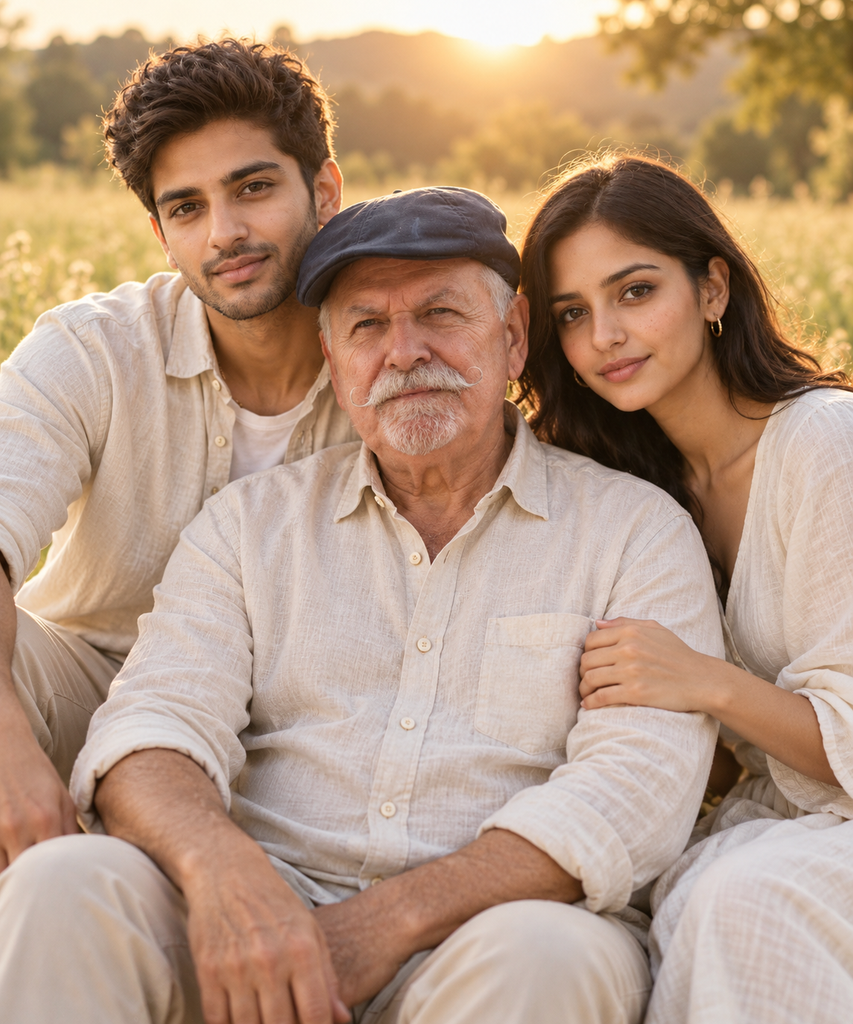
"Transform the uploaded family photo into a golden hour outdoor portrait in a sunlit meadow, all wearing simple neutral linen outfits, warm backlight, relaxed natural smiles. Keep all uploaded people, preserve their faces exactly. Shallow depth of field, soft blur background, photorealistic and premium lifestyle feel. Negative prompt: No extra people, no distorted faces.
This prompt is designed to transform an ordinary family photo into a beautiful golden-hour outdoor portrait. It keeps the people recognizable while placing them in a sunlit meadow with warm backlighting, soft background blur, natural smiles, and coordinated neutral linen outfits. The result has a photorealistic, elegant, premium family-lifestyle photography feel.
How to use: Upload your family photo to an AI image generator, then paste the prompt and generate the image. For the best results, use a clear photo where all family members’ faces are visible. You can also adjust the setting, clothing colors, lighting, or mood in the prompt to create different family portrait styles.
2.Dark Studio Family Portrait
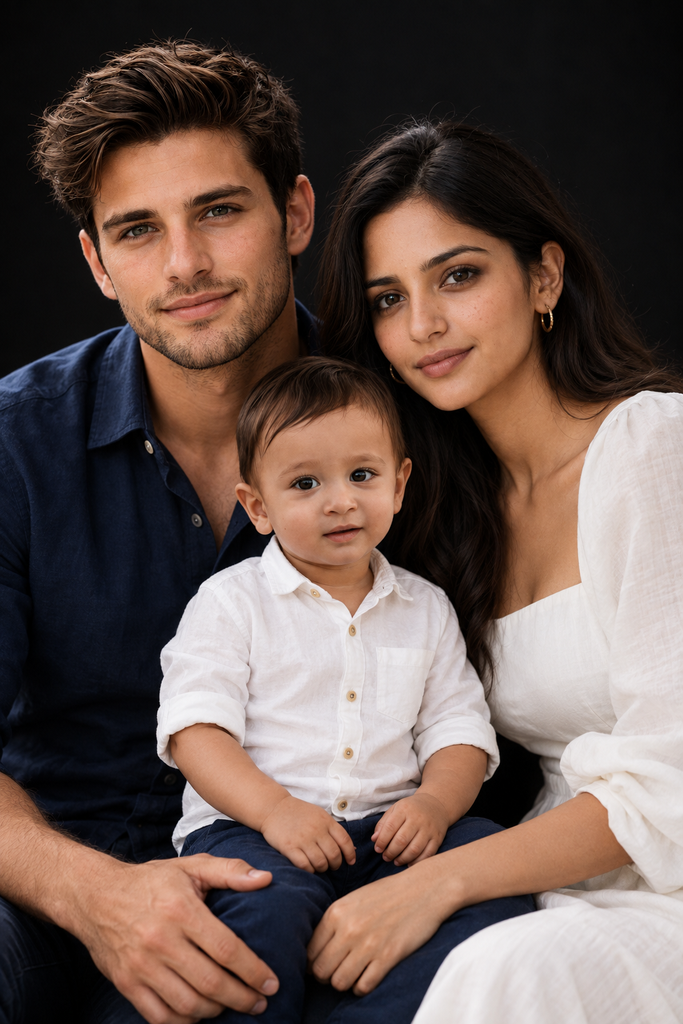
Transform the uploaded family photo into a premium dark studio portrait. Keep all family members and preserve their exact faces and identities. Use a black background, soft cinematic lighting, natural expressions, and coordinated elegant outfits in white, navy, and blue. Photorealistic, high-end DSLR photography, realistic skin texture, sharp facial details, shallow depth of field. No extra people, no distorted faces, no text, no watermark.
This prompt turns a regular family photo into an elegant, professional studio portrait with a dark black background and cinematic lighting. Coordinated white, navy, and blue outfits create a stylish and timeless look, while realistic skin texture and sharp facial details help maintain a natural photographic appearance.
How to use: Upload your family photo to an AI image generator and paste the prompt. Use a clear image with all family members visible for better results. You can also change the outfit colors or lighting style to match your preferred wallpaper aesthetic.
3.Timeless Classic Oil Painting Family Portrait
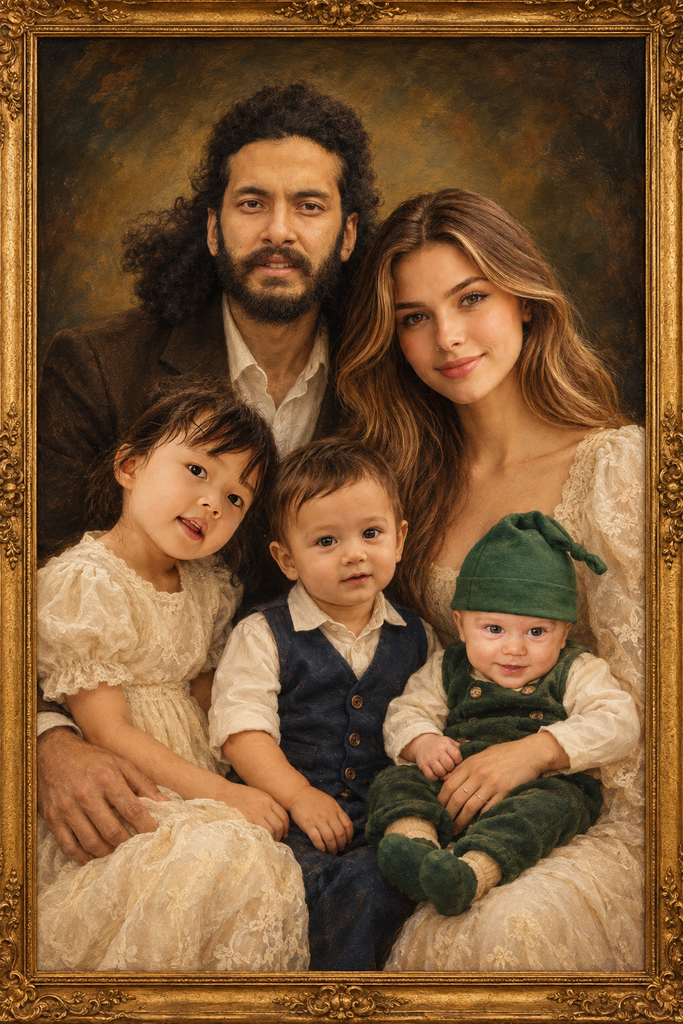
Transform the uploaded family photo into a timeless classic oil painting. Keep all family members and preserve their exact faces and identities. Use warm golden lighting, rich earthy tones, elegant formal posing, detailed brushwork, and a vintage framed portrait aesthetic. High-detail traditional oil painting, realistic faces, museum-quality finish. No extra people, no distorted faces, no text, no watermark.
This prompt transforms a regular family photo into a classic, museum-style oil painting with a warm and elegant appearance. Rich earthy colors, golden lighting, traditional brushwork, and a vintage frame give the portrait a timeless artistic feel while keeping the family members recognizable and their facial details natural.
How to use: Upload your family photo to an AI image generator and paste the prompt. A photo with clear faces and good lighting will usually produce better results. You can also customize the prompt by changing the color palette, clothing style, frame design, or painting style to create a more personal family portrait.
4.Cinematic Family Side-Profile Portrait
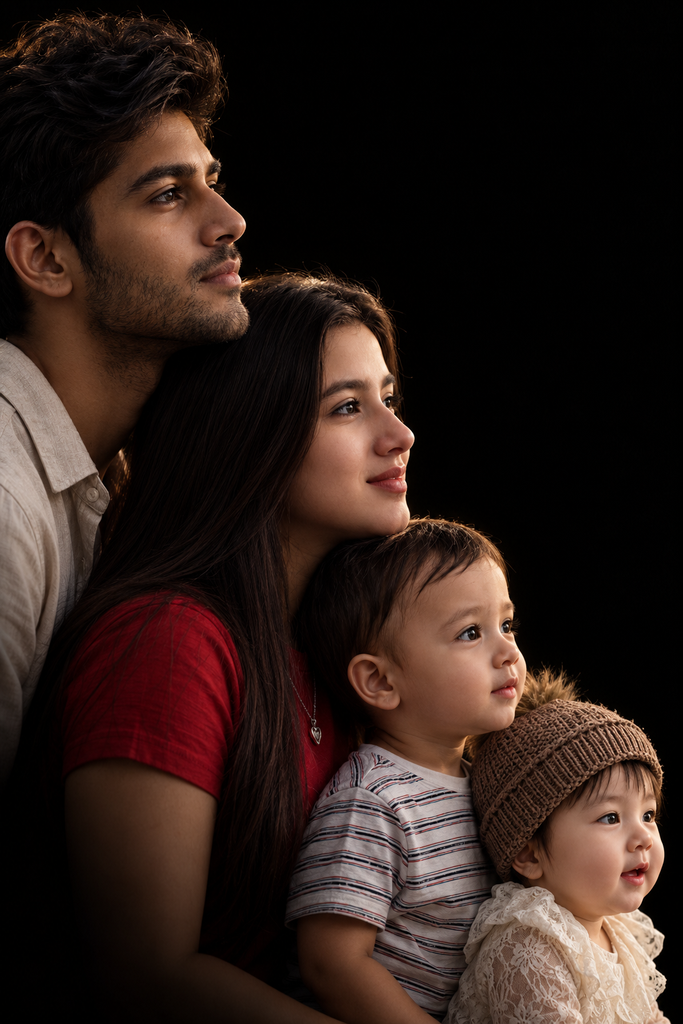
Transform the uploaded family photo into a sophisticated cinematic side-profile portrait. Keep all family members and preserve their facial identities and natural features. Arrange everyone vertically in a layered profile composition, with each person slightly overlapping the next and looking in the same direction. Use a pure black background, dramatic low-key studio lighting, subtle highlights along the face and hair, deep shadows, and strong separation from the background. Photorealistic, high-end professional photography, realistic skin texture, sharp facial details, elegant composition, timeless cinematic mood. No extra people, no missing family members, no duplicated faces, no distorted features, no text, no watermark.
This prompt creates the popular cinematic family profile effect, where family members appear one behind another at different heights against a completely black background. Soft rim lighting highlights the edges of their faces and hair while the shadows create a dramatic, premium studio look.
How to use: Upload individual photos of each family member, preferably clear front or side-profile photos, and paste the prompt into your AI image generator. The AI will combine the separate portraits into one cohesive family composition. For a wallpaper, add “vertical 9:16 mobile wallpaper, high resolution, 4K” to the end of the prompt.
5.Timeless Black & White Family Portrait
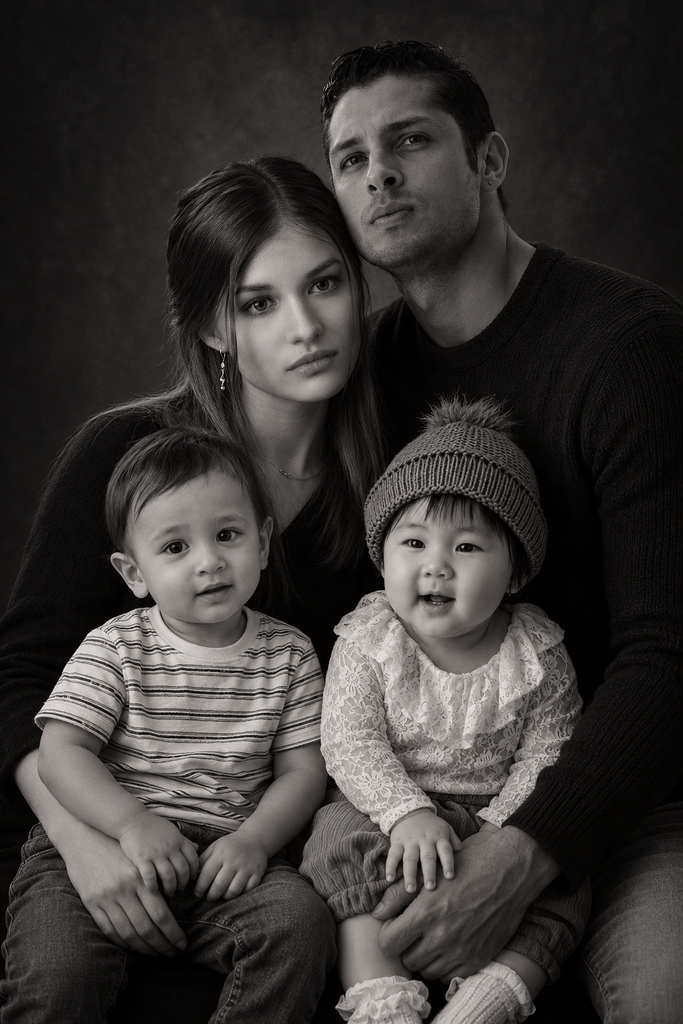
Transform the uploaded family photo into a timeless black-and-white studio portrait. Keep all family members and preserve their exact faces and identities. Arrange the parents behind the children in a close, natural composition with warm expressions. Use soft dramatic lighting, a dark textured background, rich blacks, smooth grayscale tones, realistic skin texture, and elegant professional photography. High-end DSLR, sharp facial details, subtle film grain, cinematic and emotional. No extra people, no distorted faces, no text, no watermark.
This prompt transforms a regular family photo into an elegant black-and-white studio portrait with a classic and emotional feel. The dark textured background, rich blacks, smooth grayscale tones, and soft dramatic lighting create a professional photography look while keeping the family together in a natural composition.
How to use: Upload your family photo to an AI image generator and paste the prompt. For the best results, use a clear photo where all family members are visible and their faces are easy to recognize. You can also add “vertical 9:16 mobile wallpaper, HD 4K resolution” if you want to use the finished portrait as a phone wallpaper.
6.Luxury Vintage Hollywood Family Portrait
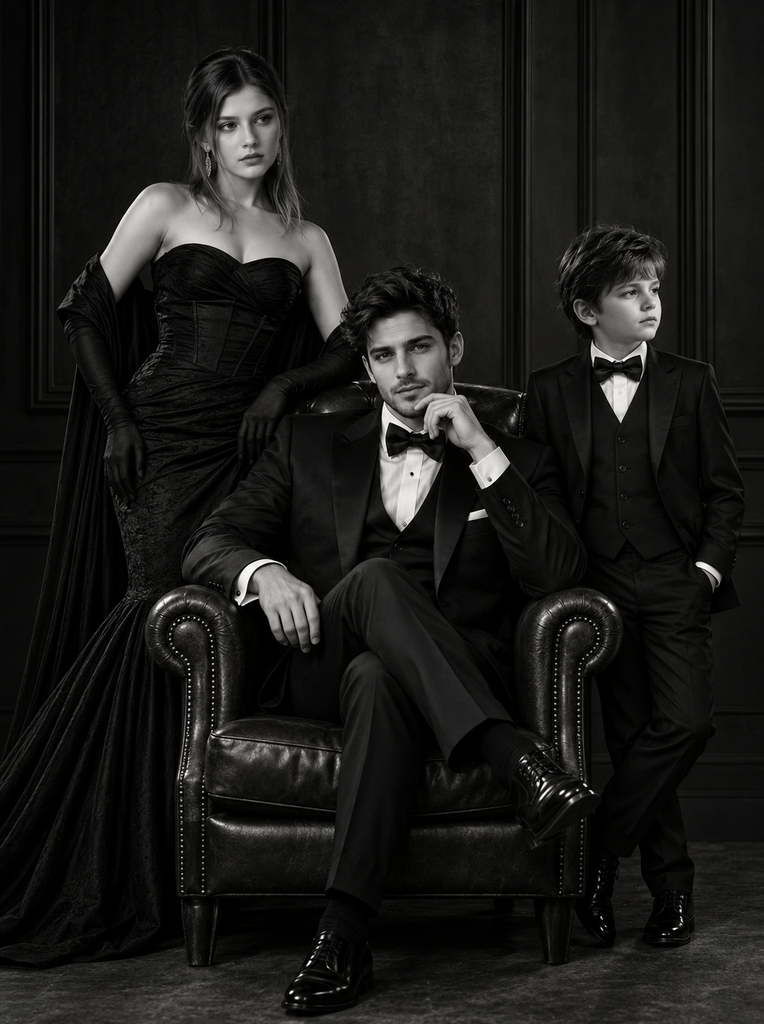
Transform the uploaded family photo into a luxurious black-and-white vintage Hollywood family portrait. Keep every family member and preserve their facial identity, facial features, skin tone, age, and natural proportions accurately. Arrange the family in an elegant editorial composition, with the father seated confidently in a classic leather armchair, the mother standing gracefully beside or behind him, and the children positioned naturally around them. Dress everyone in sophisticated formal black-and-white outfits, including a classic tuxedo for the father, an elegant evening gown for the mother, and stylish formal attire for the children. Use a dark paneled studio background, vintage leather furniture, dramatic low-key lighting, deep shadows, strong highlights, rich blacks, smooth grayscale tones, and cinematic contrast. Create a timeless luxury magazine and classic Hollywood photography aesthetic, realistic skin texture, sharp facial details, subtle film grain, high-end DSLR photography, sophisticated and emotional mood. Keep the composition balanced and natural. No extra people, no missing family members, no duplicated faces, no distorted faces, no artificial skin, no text, no watermark.
This prompt transforms a regular family photo into a luxurious vintage Hollywood-style portrait with an elegant, cinematic atmosphere. Formal black-and-white clothing, a classic leather armchair, theatrical curtains, dramatic lighting, deep shadows, and rich contrast create the feeling of a timeless professional studio photograph.
How to use: Upload your family photo to an AI image generator and paste the prompt. For the most accurate result, use clear photos where each family member’s face is visible. You can also customize the clothing, background, or vintage style while keeping the family composition natural and realistic.
Frequently Asked Questions About Family Photo Wallpapers
What is a family photo wallpaper?
A family photo wallpaper is a personalized background created from a favorite family picture. It can be used on smartphones, tablets, laptops, and desktop computers to keep a special family memory on your screen.
Where can I find family photo wallpaper HD 4K?
You can create family photo wallpapers in HD or 4K resolution using a high-quality family picture. Choose a wallpaper size and aspect ratio that matches your device for the best result.
Can I use a family photo wallpaper HD 4K for mobile?
Yes. You can create a vertical family photo wallpaper specifically for mobile phones. A 9:16 format is a useful starting point for many smartphones, with enough space around faces for icons and lock-screen elements.
Can I use a family photo wallpaper HD 4K for PC?
Yes. A family picture can be turned into a high-resolution desktop wallpaper for a PC or laptop. For the best appearance, use a landscape image that matches your monitor’s resolution and aspect ratio.
Can I use a family photo wallpaper on an iPhone?
Yes. You can turn your favorite family picture into a beautiful iPhone wallpaper. Use a vertical, high-resolution image and leave enough space around important faces for the clock and other lock-screen elements.
Where can I download family photo wallpapers for free?
You can create free family photo wallpapers using your own pictures and photo or AI editing tools. If you download an image from another website, check its usage rights before using it.
How can I make a beautiful family photo wallpaper?
Start with a clear family picture and choose a style that fits your preference. You can create outdoor portraits, cinematic studio photos, black-and-white portraits, vintage designs, or artistic family wallpapers using AI prompts.
What is the best family photo wallpaper for a phone?
The best family photo wallpaper depends on your phone and personal style. A vertical HD or 4K image with clear faces, balanced composition, and some empty space for icons usually gives a clean result.
How can I turn my family picture into a 4K wallpaper?
Upload a clear family picture to an AI image or photo-editing tool and describe the style you want. You can request HD or 4K quality, specify a mobile or desktop format, and ask the tool to preserve the family’s appearance.
Can AI create a wallpaper from my family photo?
Yes. AI tools can transform a family photo into many different wallpaper styles, including cinematic portraits, golden-hour scenes, luxury studio portraits, vintage photography, and artistic paintings.
How do I choose the right family picture for a wallpaper?
Choose a clear, well-lit photo where the family members are easy to recognize. Higher-resolution pictures generally produce better results, especially when creating HD or 4K wallpapers.
Can I create a sweet family wallpaper with a personal style?
Yes. You can personalize a family wallpaper with warm lighting, soft colors, nature backgrounds, seasonal themes, elegant outfits, or a simple minimalist design to match your preferred look.