
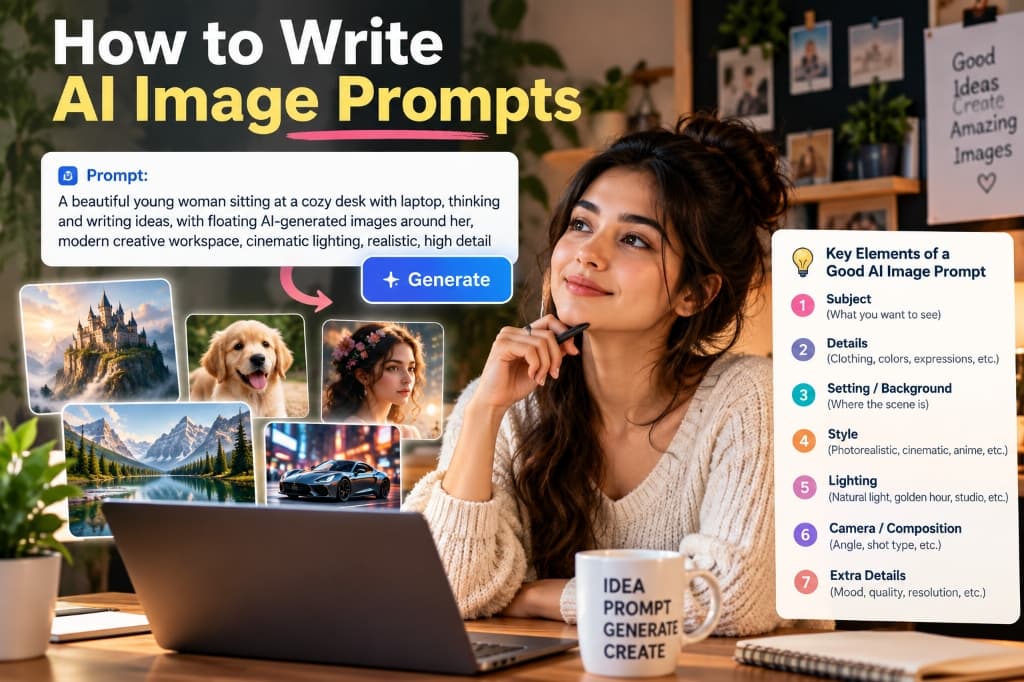
If you have ever opened an AI image generator, typed a simple idea like “a girl in a coffee shop”, and received a strange, waxy figure with distorted fingers and sterile lighting—you are not alone.
More than 90% of beginners struggle with AI image generation. The problem is not the AI model; it is the way we communicate with it. AI generators like Midjourney, Flux, ChatGPT (DALL-E 3), and Stable Diffusion do not read your mind. They require structured, visual instructions—what professional creators call prompt architecture.
In this masterclass guide, we break down the 7 essential elements shown in our visual blueprint, reveal how to translate basic ideas into photographic art, and provide battle-tested, copy-and-paste prompt templates for social media, photo editing, and image-to-video generators.
The 7 Key Elements of a High-Yield AI Image Prompt
Every photorealistic, gallery-grade AI image is built upon seven foundational layers. When you include these seven parameters in sequence, you eliminate random algorithmic guesswork:
- 1. Subject: What you want to see (gender, age, species, focal object, or character identity).
- 2. Details: Wardrobe, fabric textures, colors, hair, facial features, and subtle expressions.
- 3. Setting / Background: Where the scene takes place (interior, outdoor landscape, architecture, background blur).
- 4. Style: The artistic medium (photorealistic, cinematic film, anime, editorial, 3D clay render).
- 5. Lighting: Direction, source, and temperature (golden hour, softbox diffused studio light, neon glow, volumetric rim lighting).
- 6. Camera / Composition: Perspective and optics (eye-level shot, 85mm portrait lens, shallow depth of field, wide-angle 24mm).
- 7. Extra Details: Mood, atmosphere, color grading, fine grain, and resolution cues.
Deconstructing the Cover Prompt: Line-by-Line Breakdown
Look at the visual demonstration in our hero graphic above. The entire scene was generated using this single, cohesive formula:
A beautiful young woman sitting at a cozy desk with laptop, thinking and writing ideas, with floating AI-generated images around her, modern creative workspace, cinematic lighting, realistic, high detailNotice how every single clause in that sentence directly answers one of the 7 pillars:
- Subject: “A beautiful young woman”
- Action & Details: “thinking and writing ideas, sitting with laptop”
- Setting: “at a cozy desk... modern creative workspace”
- Composition Element: “with floating AI-generated images around her”
- Lighting: “cinematic lighting”
- Style & Quality: “realistic, high detail”
The 5 Micro-Prompts Featured in the Scene
Notice the five floating photos radiating from the laptop screen? Each represents a distinct creative genre you can easily reproduce using the same 7 elements:
Majestic medieval stone castle perched atop a rugged mountain peak, surrounded by dramatic misty clouds, golden sunlight breaking through storm clouds, hyper-detailed epic fantasy landscape, wide angle, 8k resolutionAdorable fluffy golden retriever puppy sitting outdoors in soft meadow grass, joyful expression with tongue out, warm natural morning sunlight, shallow depth of field, 85mm portrait lens, photorealistic fur textureClose-up portrait of an ethereal young woman adorned with delicate wildflowers in her wavy brown hair, gentle candid expression, soft diffuse window light, creamy bokeh background, high fashion editorial aestheticCrystal-clear alpine lake reflecting towering snow-capped mountain peaks and evergreen pine trees, serene morning mirror reflection, crisp cool dawn light, ultra-sharp landscape photography, 35mm lensSleek modern black sports car parked on a rain-slicked city street at night, vibrant neon pink and cyan light reflections on glossy carbon fiber body, low-angle dramatic shot, cinematic lightingHow to Write AI Image Prompts From Text (The Step-by-Step Translation)
When creators ask “how to write AI image prompts from text”, they usually mean: How do I turn a plain text thought into an image prompt that produces exactly what I envision?
Follow this 3-step progressive expansion method:
Phase A: State Your Core Subject (The Noun Phase)
Start with your fundamental subject. Avoid abstract adjectives.
- ❌ “A cool coffee shop”
- ✅ “A barista pouring latte art in a sunlit Scandinavian coffee shop”
Phase B: Layer Sensory Details & Environment (The Adjective Phase)
Add tangible textures, materials, and atmospheric depth:
- Add materials: “rustic reclaimed oak counter, exposed white brick wall, copper espresso machine”
- Add action & mood: “steaming milk pitcher, delicate foam rosetta pattern, calm morning atmosphere”
Phase C: Set the Camera & Lighting Parameters (The Director Phase)
Instruct the AI on where to place the “virtual camera” and what light to cast:
- Lighting: “soft morning sunlight streaming through tall floor-to-ceiling windows”
- Optics: “close-up shot on an 85mm f/1.8 lens, shallow depth of field, creamy background blur”
A skilled barista pouring intricate latte art into a ceramic cup on a rustic reclaimed oak counter, steam rising gently, sunlit Scandinavian coffee shop with exposed brick and hanging green plants, warm morning sunlight through tall windows, close-up shot on 85mm f/1.8 lens, shallow depth of field, natural photorealistic textureHow to Write AI Image Prompts for Free (Top Zero-Cost Tools)
You do not need a \$30/month Midjourney subscription to create world-class AI imagery. Here are the most capable 100% free AI image tools in 2026 and how to prompt each one:
1. Microsoft Copilot Designer (DALL-E 3)
Cost: Free with Microsoft Account.
Best For: Natural conversational language. DALL-E 3 understands full grammatical sentences better than comma-separated keywords.
2. Flux.1 Schnell (via Fal.ai or Hugging Face)
Cost: Free on public HuggingFace Spaces.
Best For: Unmatched photorealism, realistic human skin pores, and authentic hand anatomy.
3. Fooocus (Local SDXL Engine)
Cost: 100% Free & Open Source.
Best For: Offline generation with built-in photographic style presets and automated negative prompt filtering.
4. Playground AI & Leonardo AI
Cost: Generous free daily token allocation.
Best For: Inpainting, Canvas editing, and commercial product staging.
AI Prompt Examples for Photo Editing (Inpainting & Relighting)
Modern AI is no longer just for generating images from scratch; it is the ultimate tool for photo editing, background swapping, and wardrobe replacement.
When using inpainting tools (such as Midjourney Vary (Region), Photoshop Generative Fill, or Leonardo Canvas), follow the Isolate and Replace Rule: only describe what should exist inside the selected brush area, maintaining the surrounding light source.
Crisp tailored navy blue Italian wool blazer over a white crewneck t-shirt, realistic fabric folds, matching the ambient golden hour lighting of the original portraitBlurred modern luxury penthouse living room in Tokyo at dusk, floor-to-ceiling glass windows with shimmering city lights, soft ambient interior lamp glow, f/1.8 bokehSubtle confident smile, natural eye contact with camera, gentle warm rim light along the cheekbone, authentic skin texture with zero plastic smoothingHow to Write AI Prompts for Image-to-Video (Kling, Runway & Luma)
With the rise of video models like Kling AI, Runway Gen-3 Alpha, Luma Dream Machine, and Pika 2.0, creators now translate static AI images into cinematic motion clips.
Image-to-video prompting is fundamentally different from image generation. Because the model already knows what the image looks like, your prompt must describe Motion, Camera Movement, and Speed:
[Camera Direction] + [Subject Movement] + [Environmental Dynamics] + [Speed & Tempo]

Example: Slow cinematic push-in camera movement toward the subject, gentle wind blowing through hair, soft blinking and natural breathing, warm light flickering subtly, 4k 24fps film motion
Key Video Movement Directives to Use:
- Camera Movement: “Slow orbit pan around subject”, “Drone shot rising vertically”, “Handheld documentary camera shake”.
- Environmental Motion: “Raindrops cascading down window glass”, “Smoke swirling in backlighting”, “Trees swaying in evening breeze”.
- Pacing: “Smooth slow-motion 60fps”, “Gentle and steady motion, no sudden jumps”.
Best AI Prompts for Images: 10 Copy-and-Paste Templates
Use these pre-tested, high-performance prompt templates across Midjourney v6.1, Flux.1, or ChatGPT. Simply click the copy button and paste into your AI generator:
A stunning 26-year-old woman with natural freckles and windswept chestnut hair, wearing an off-white cashmere knit sweater, standing on a sand dune during golden hour, sun flare behind her, shot on Hasselblad H6D-100c with 100mm lens, shallow depth of field, authentic film textureModern brutalist concrete villa nestled in a lush tropical jungle, sunken conversation pit with warm linen cushions, floor-to-ceiling sliding glass doors, gentle morning mist and diffused sunlight filtering through palm leaves, architectural digest photographyAn elegant amber glass perfume bottle with gold cap resting on wet obsidian stone, gentle water droplets on the glass, soft dramatic backlighting creating a golden glow through the liquid, subtle smoke swirls in dark background, high-end commercial luxury advertA cyberpunk street vendor cooking noodles at a neon-lit night stall in Neo-Tokyo, rain falling through vibrant holographic advertisements, steam rising from boiling wok, atmospheric reflection on wet asphalt, cinematic 50mm f/1.4 lens, blade runner aestheticCute cozy isometric 3D render of an artist's miniature studio apartment, warm fairy lights, tiny wooden easel with canvas, potted monstera plants, soft pastel color palette, blender 3D style, clean ambient occlusion, smooth clay textures5 Critical Mistakes That Ruin Your AI Images
- Keyword Overload (Word Salad): Stacking 20 adjectives like “photorealistic, ultra, 8k, trending, best, masterpiece” confuses the model’s attention tokens. Use concise, descriptive phrases instead.
- Ignoring Lighting: Lighting makes or breaks realism. An image with unspecified lighting will default to flat, artificial illumination. Always declare a light source (e.g., “golden hour rim light”, “diffused north-facing window light”).
- Using Negative Language: Telling the model “no cars, no hats, don’t make it blurry” often causes the model to generate those exact items because diffusion networks focus on the noun. Use negative prompt fields instead (e.g.,
--no cars, hats). - Forgetting Aspect Ratio: Square 1:1 is the default in many tools, but portraits look dramatically better in 4:5 or 9:16, while cinematic scenes require 16:9 or 21:9.
- Missing Physical Texture: To escape the waxy “AI look”, explicitly specify natural textures: “visible skin pores, fine fabric weave, subtle film grain, natural flyaway hairs”.
Frequently Asked Questions
What is the best prompt format for AI images?
The most reliable format across modern diffusion models is: [Subject + Details] + [Setting/Background] + [Lighting & Time] + [Camera Angle & Lens] + [Style & Film Medium].
Does Midjourney prompt differently than ChatGPT (DALL-E 3)?
Yes. ChatGPT thrives on complete, narrative descriptive sentences. Midjourney prefers structured visual phrases separated by commas, alongside native parameters like --ar 16:9 and --style raw.
How do I make AI images look like real photography?
Use real camera optics terminology (e.g., “shot on 85mm f/1.4 prime lens”), specify authentic film stocks (e.g., “Kodak Portra 400”), and describe human imperfections like skin pores, freckles, and unposed body language.
Ready to Generate Stunning Images?
Browse hundreds of tested, verified AI image prompts created by top creators on EmtyBrain. Copy, remix, and create in seconds.
AI Image Prompts for Social Media (Instagram, YouTube & LinkedIn)
Social media platforms prioritize instant visual hooks. Here is how to prompt for maximum engagement across different feeds:
1. Instagram Lifestyle & Travel Aesthetic
Candid film photograph of a stylish 23-year-old woman sitting at an outdoor Parisian café table, drinking an iced matcha latte, oversized linen shirt and vintage sunglasses, soft golden hour sunlight, Kodak Portra 400 film grain, 35mm lens --ar 4:52. High-CTR YouTube Thumbnail Staging
Shocked young male creator looking directly at the camera with wide eyes and mouth open, pointing toward a glowing futuristic holographic cube on desk, vibrant neon blue and orange studio rim lighting, ultra-sharp expression, YouTube thumbnail composition with negative space for text --ar 16:93. Professional LinkedIn Studio Headshot
Professional corporate headshot of a confident 30-year-old female executive in a charcoal grey tailored blazer, friendly welcoming smile, modern clean architectural office background with soft blur, diffuse studio beauty dish lighting, 85mm portrait lens, ultra-sharp resolution