
If you have progressed past typing basic phrases like “cinematic portrait of a warrior, 8k” and want to achieve pinpoint compositional control, photographic optics, coherent anatomy, and commercial-grade art, you need more than trial and error. You need advanced prompt engineering techniques.
Generative AI models like Midjourney v6.1, Flux.1 (Schnell/Dev), Stable Diffusion 3.5, and ChatGPT (DALL-E 3) process text through complex multimodal embedding spaces. Knowing where to find parameter dictionaries, latent diffusion weights, negative token formulas, and optical descriptors separates casual experimenters from world-class visual directors.
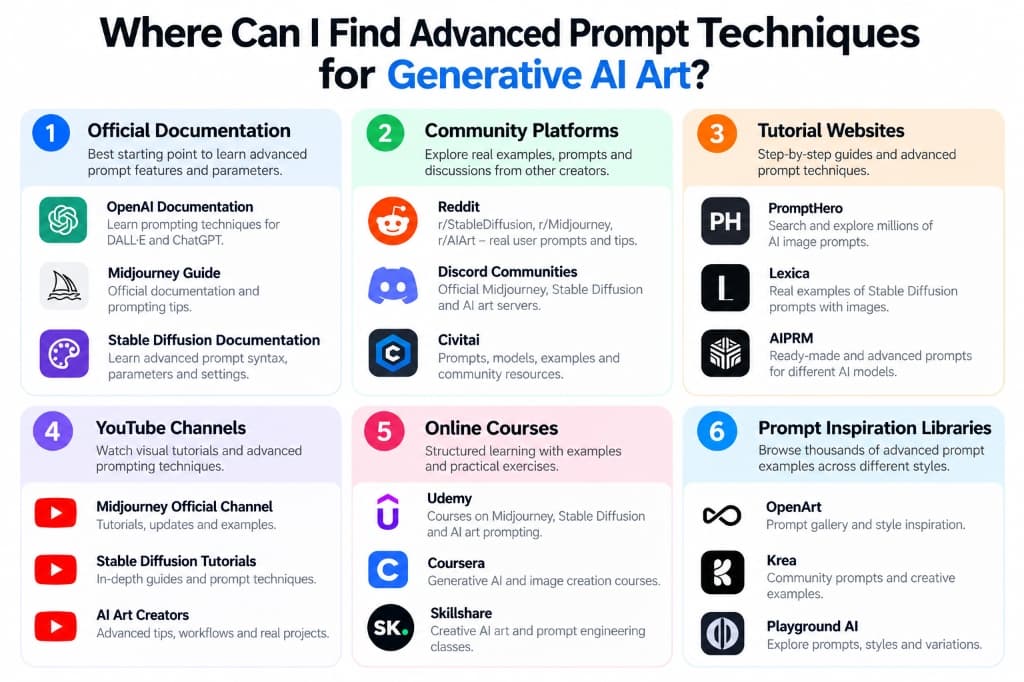
Based on our verified research infographic, this comprehensive blueprint uncovers the 6 essential hubs where you can find, dissect, and master advanced prompt techniques for generative AI art in 2026.
Where Can You Find Advanced Prompt Techniques? The 6 Key Hubs
Mastering advanced generative art requires drawing knowledge from distinct layers of the AI ecosystem:
- 1. Official Documentation: The authoritative source for core syntax, model parameters, seed controls, aspect ratios, and architectural updates.
- 2. Community Platforms: Live peer discussions, experimental prompt recipes, troubleshooting logs, and parameter breakdowns from active creators.
- 3. Tutorial Websites: Indexed search engines and reverse-engineering repositories that display full prompt metadata alongside generated images.
- 4. YouTube Channels: Step-by-step visual demonstrations showcasing real-time prompt adjustments, camera angles, and rendering comparisons.
- 5. Online Courses: Structured curriculums covering foundational optics, commercial creative workflows, and advanced prompt architecture.
- 6. Prompt Inspiration Libraries: Curated visual galleries with one-click copyable formulas, model tags, and curated style sets (such as EmtyBrain).
1. Official Documentation: Best Starting Point for Core Syntax & Parameters
The single most underutilized resource in prompt engineering is the primary documentation published by model developers. While social media often peddles outdated buzzwords, official guides reveal the precise parameter flags and token structures that models are explicitly programmed to parse.
OpenAI Documentation (ChatGPT & DALL-E 3)
OpenAI's developer documentation and prompting guides teach you how ChatGPT interprets visual intent. Unlike earlier token-based systems, DALL-E 3 thrives on descriptive, natural language narratives with rich contextual prose.
- What to look for: Natural language spatial descriptions, foreground vs. background hierarchies, avoiding contradictory adjectives, and controlling style consistency across multi-turn chats.
- Best URL: platform.openai.com/docs/guides/images
Midjourney User Guide & Docs
Midjourney's documentation is a goldmine for understanding CLI parameter flags that radically alter aesthetic outputs without changing your prompt wording.
- Core advanced parameters:
--v 6.1(model version),--stylize <0-1000>(artistic freedom),--chaos <0-100>(grid diversity),--weird <0-3000>(unconventional aesthetics),--cref <URL>(character reference), and--sref <URL>(style reference). - Multi-prompt weighting: Using double colons
::to assign relative weights (e.g.,cyberpunk city::2 street food vendor::1 --no rain). - Best URL: docs.midjourney.com
Stable Diffusion & ComfyUI Documentation
Stable Diffusion (SDXL, SD 3.5, and Flux.1) gives you bare-metal control over the latent diffusion process. Official docs and community wikis explain parameter mathematics that directly impact generation quality.
- Technical controls: CFG Scale (Classifier-Free Guidance), Sampler algorithms (Euler A, DPM++ 2M Karras), Denoising strength for inpainting, and LoRA weight syntax (
<lora:cinematic_lens:0.8>). - Best URL: stability.ai/documentation and ComfyUI GitHub documentation.
2. Creator Communities: Real-Time Experiments, Prompts & Discussions
Prompt engineering evolves on an almost daily basis. Online communities are where cutting-edge techniques are stress-tested, shared, and debated long before they appear in formal articles or books.
Reddit (r/StableDiffusion, r/Midjourney, r/AIArt)
Reddit is the largest public forum for prompt troubleshooting. Creators frequently post side-by-side comparison grids demonstrating how changing a single keyword or token weight transformed an entire scene.
Pro tip: Filter by “Top - Past Month” and search for terms like “workflow included” or “prompt formula” to find complete generation recipes.
Discord AI Communities
Official servers (such as the Midjourney Discord and Stability AI Discord) have dedicated #prompt-craft and #showcase channels where thousands of prompts are shared every hour.
Pro tip: Watching live channels in Midjourney lets you observe prompt experiments in real time, seeing both successful iterations and failed prompts.
Civitai: The Open-Source Powerhouse
Civitai is the undisputed epicenter of open-source generative art. Every single image uploaded to Civitai includes full, unstripped generation metadata: prompt, negative prompt, model checkpoint, seed, sampler, CFG scale, and LoRA stack.
By clicking the “Copy Generation Data” button on any image that catches your eye, you can inspect the exact prompt structure that created it and adapt those tokens for your own creative projects.
3. Dedicated Tutorial Websites: Step-by-Step Guides & Prompt Search Engines
When you need reverse-engineering tools and curated prompt libraries, dedicated prompt engineering websites offer searchable databases with millions of indexed generations.
- PromptHero: A premier prompt search platform indexing millions of high-quality outputs across Midjourney, Stable Diffusion, DALL-E, and ChatGPT. You can filter by categories (such as Portraits, Photography, and Anime) and inspect full copyable prompt texts.
- Lexica.art: Originally built as a Stable Diffusion search engine, Lexica hosts millions of photorealistic and artistic images along with the exact prompts and seeds used to produce them.
- AIPRM: A widely-used prompt engineering community repository with vetted, categorized prompt templates engineered for specific artistic styles, marketing assets, and design mockups.
4. YouTube Channels: Visual Tutorials, Camera Optics & Live Breakdowns
Reading text prompts only teaches half the skill; watching an expert visual director construct a prompt from scratch provides the visual intuition needed for mastery.
Top YouTube Learning Paths
- Official Midjourney & Diffusion Streams: Regular feature deep dives exploring new syntax releases, texture rendering, and version updates.
- ComfyUI & Stable Diffusion Specialists: Channels such as Olivio Sarikas, Sebastian Kamph, and Matt Wolfe break down node graphs, ControlNet setups, and lighting prompt modifiers with scientific rigor.
- Photographic & Cinematography Channels: The most effective prompt engineering channels often come from actual photographers teaching how real-world optics (e.g., anamorphic lenses, focal lengths, rim lighting, and shutter speeds) translate into neural network prompts.
5. Online Courses: Structured Learning with Exercises & Workflows
If you prefer organized curriculums over piecing together scattered tips from forums, structured online courses provide comprehensive frameworks:
Udemy
Offers dozens of project-based masterclasses on Midjourney, Stable Diffusion, and prompt engineering, complete with downloadable parameter cheat sheets and prompt swipe files.
Coursera
Specialized academic and industry certifications in Generative AI, natural language processing, and multimodal prompt architecture from leading universities and AI institutes.
Skillshare
Focused on creative professionals, digital illustrators, and graphic designers looking to incorporate AI prompt engineering into commercial branding, concept art, and digital illustration.
6. Prompt Inspiration Libraries & Curated Hubs (OpenArt, Krea & EmtyBrain)
Prompt libraries bridge the gap between abstract theory and immediate creative execution. By exploring verified visual prompt collections, you can quickly discover fresh lighting formulas, optical styles, and thematic compositions.
EmtyBrain: Tested Formulas, Direct Model Presets & Sound Pairing
Here on EmtyBrain, every prompt is tested for multi-model reliability across ChatGPT, Midjourney, and Gemini. Rather than dumping raw unverified strings, EmtyBrain provides:
- One-Click Prompt Copying: Copy production-tested prompt text instantly without messy formatting artifacts.
- Multi-Prompt Image Sets: Dissect step-by-step progressions and angle variations for single character workflows.
- Dedicated Category Hubs: Explore specialized prompts across Photography, Fashion, Portraits, Cinematic, Luxury, and Kids.
- Model Filtering: Easily toggle between Midjourney, ChatGPT, and Gemini presets to match your preferred generation tool.
OpenArt.ai
Features an extensive community prompt book, interactive prompt builders, and visual exploration feeds categorized by art movement, digital mediums, and 3D rendering styles.
Krea.ai & Playground AI
Real-time canvas generation platforms where you can view live prompt transformations, experiment with style sliders, and remix community generations with one click.
What Actually Makes a Prompt “Advanced”? The Technical Breakdown
A beginner prompt describes what an object is (e.g., “a sports car in a city”). An advanced prompt specifies the physical, optical, and environmental conditions that dictate how the neural network calculates lighting, perspective, and material textures.
The 6 Technical Pillars of Advanced Prompting
- Camera Optics & Hardware: Name-dropping specific camera bodies, focal lengths, and aperture settings (e.g., “Hasselblad H6D-100c, 85mm f/1.4 lens, shallow depth of field, natural bokeh”) anchors the latent diffusion model into real optical physics.
- Volumetric Lighting Physics: Instead of generic “good lighting”, advanced prompts specify light sources and modifiers (e.g., “diffused softbox key light, golden rim light, chiaroscuro shadow falloff, cinematic atmospheric haze”).
- Material & Surface Textures: Directing sub-surface scattering, reflections, and imperfections (e.g., “micro-skin pores, woven raw linen texture, oxidized metallic patina, raindrops with chromatic refraction”).
- Compositional Framing Geometry: Defining camera angles and composition principles (e.g., “Dutch angle, rule of thirds, low-angle hero shot, anamorphic widescreen 2.39:1”).
- Token Weighting & Attention Hierarchy: Placing mission-critical subjects at the front of the prompt string to maximize transformer attention weights before token attenuation occurs.
- Negative Prompts & Exclusion Words: Systematically pruning unwanted artifacts, plastic skin sheen, extra limbs, and oversaturated contrast.
Platform Comparison Matrix: Where Should You Spend Your Time?
Depending on your learning goals, budget, and time availability, here is how the top 6 sources compare:
| Source Hub | Best For | Learning Curve | Cost | Execution Speed |
|---|---|---|---|---|
| Official Documentation | Syntax, parameters, seed flags | Medium | Free | Fast |
| Creator Communities (Reddit/Civitai) | Reverse-engineering, LoRAs, troubleshooting | Steep | Free | Medium |
| Tutorial Websites (PromptHero/Lexica) | Browsing millions of categorized outputs | Low | Free / Freemium | Instant |
| YouTube Channels | Visual workflows, ComfyUI, live demos | Medium | Free | Medium |
| Online Courses (Udemy/Coursera) | Structured end-to-end certification | Structured | $15 - $49/mo | Slow / Deep |
| EmtyBrain Inspiration Hub | Curated copy-paste prompts, model tags, sound-matched visuals | Beginner to Pro | 100% Free | Instant 1-Click |
6 Tested Copy-Paste Advanced Prompts for Midjourney, Flux & DALL-E 3
Here are 6 production-ready, advanced prompt templates illustrating the exact techniques described above. Copy and paste them into your favorite AI generator:
Cinematic editorial portrait of a 28-year-old Scandinavian woman with sharp cheekbones and platinum textured hair, shot on Hasselblad H6D-100c with 85mm f/1.4 lens. Soft directional morning window light from the left, subtle chiaroscuro shadow on the right cheek, visible skin pores, natural freckles, fine peach fuzz, delicate catchlights in green hazel eyes. Wearing a minimalist oversized charcoal wool blazer. Clean warm ivory studio backdrop, shallow depth of field, authentic photographic grain, 35mm film aesthetic --ar 4:5 --v 6.1 --stylize 250Ultra-wide cinematic establishing shot of a rainy cyberpunk alleyway in Neo-Tokyo, ground-level perspective. High-tech street ramen stall illuminated by glowing neon orange and cyan kanji holograms, rain puddles reflecting vibrant street signs with realistic surface dispersion. A solitary cyborg courier in matte black techwear jacket with subtle luminescent circuitry, steam rising from sewer grates, atmospheric volumetric mist, depth of field blur in distant skyscrapers. Kodachrome color science, anamorphic lens flare, sharp focus, 8k resolution --ar 21:9 --v 6.1Breathtaking fantasy environment, floating crystalline monoliths hovering over an ancient bioluminescent waterfall canyon. Lush emerald moss, weeping willows with glowing violet pollen particles floating in the twilight air. Golden hour rim lighting catching the mountain ridges, soft volumetric sun rays breaking through purple thunderstorm clouds, deep atmospheric perspective, matte painting style by Eyvind Earle and Moebius, rich textures, fine architectural ruins in distance --ar 16:9 --stylize 400Commercial product photography of an amber glass perfume bottle with minimalist serif typography and brushed brass cap, resting on a chiseled travertine stone pedestal. Natural warm sunlight casting harsh geometric diagonal shadows through an arched window. Soft beige linen background, water droplets with specular highlights on glass surface, crisp focus on label, premium luxury cosmetics campaign aesthetic, Hasselblad medium format --ar 4:5High-octane anime keyframe of a young samurai warrior unleashing a whirlwind elemental strike, dynamic low-angle camera angle. Swirling wind petals and ember sparks glowing in vibrant crimson and gold, intense determined expression, windswept dark hair. Fluid anime line art, painterly digital background with stormy night sky, dramatic rim lighting, Studio Ufotable aesthetic, motion blur on sword trail, cinematic anime still --ar 16:9 --niji 6Interior architecture of an orbital deep-space observatory lounge, curved panoramic observation window looking out at Saturn's glowing rings. Brutalist minimalist warm wood paneling, recessed diffuse ceiling lighting, leather lounge chairs with soft leather creases. A lone astronaut sitting with hot espresso cup, ambient starlight illuminating the dust motes in air, 70mm Panavision lens, Denis Villeneuve film still --ar 2.39:15 Pro Tips to Accelerate Your Prompt Engineering Learning Curve
- 1. Maintain a Personal “Swipe File”: Whenever you encounter an image with exceptional lighting, color grading, or texture, copy the prompt and save it in a private digital notebook with tags (e.g., #lighting, #lens, #portrait).
- 2. Change Only One Variable at a Time: When experimenting, keep your subject and seed constant while modifying a single descriptor (e.g., changing “softbox lighting” to “chiaroscuro rim light”). This is the only way to scientifically understand how specific tokens impact the diffusion outcome.
- 3. Study Real Art History & Photography: Models were trained on millions of museum paintings and photographic catalogs. Terms like “sfumato”, “impasto”, “Kodachrome 64”, “Rembrandt lighting”, and “tilt-shift lens” evoke deeply specific latent mathematical responses that generic words like “detailed” never will.
- 4. Avoid Prompt Bloat: More tokens do not equal better art. Diffusion models experience token attenuation—words placed past token 60 or 75 have dramatically less influence on the final image. Keep prompts concise, dense, and meaningful.
- 5. Leverage EmtyBrain for Daily Inspiration: Visit EmtyBrain regularly to explore trending community creations, copy proven prompt templates with one click, and discover newly popular aesthetic styles across ChatGPT, Midjourney, and Gemini.
Frequently Asked Questions (FAQ)
Where can I find free AI art prompts that actually work?
Platforms like EmtyBrain, PromptHero, Civitai, and Lexica provide completely free access to thousands of tested, high-fidelity AI art prompts. On EmtyBrain, prompts are vetted across models like Midjourney, ChatGPT, and Gemini with 1-click copy functionality.
What is the difference between beginner and advanced AI prompting?
Beginner prompts describe only the subject (e.g., “a beautiful woman in Paris”). Advanced prompting incorporates camera optics (focal length, aperture, lens type), lighting physics (softbox, rim light, ambient falloff), color science, composition geometry (rule of thirds, Dutch angle), and model-specific parameter flags (such as --v 6.1, --stylize, and CFG scale).
Are online courses worth it for learning AI prompt engineering?
Paid courses on Udemy or Coursera can be valuable if you want a structured end-to-end curriculum or an industry certificate. However, because generative models update every few months, the fastest way to stay cutting-edge is by combining official documentation with active community hubs like Reddit, Civitai, and EmtyBrain.
How do camera settings affect AI image generation?
Specifying camera settings instructs the model to replicate specific optical characteristics. For example, adding “85mm f/1.4 lens, shallow depth of field” produces professional portrait compression with soft background blur (bokeh), while “14mm ultra-wide lens” produces expansive architectural perspective with slight barrel distortion.
Get Daily Advanced AI Prompts Delivered to Your Phone
Join thousands of creators in our free WhatsApp community. Receive tested Midjourney, ChatGPT, and Flux prompt formulas, lighting cheat sheets, and visual trend alerts every morning.
Comments & Discussion 0
Join the conversation, ask questions about this guide, or share your AI creations.
No comments yet
Be the first to share your thoughts, tips, or ask a question!