
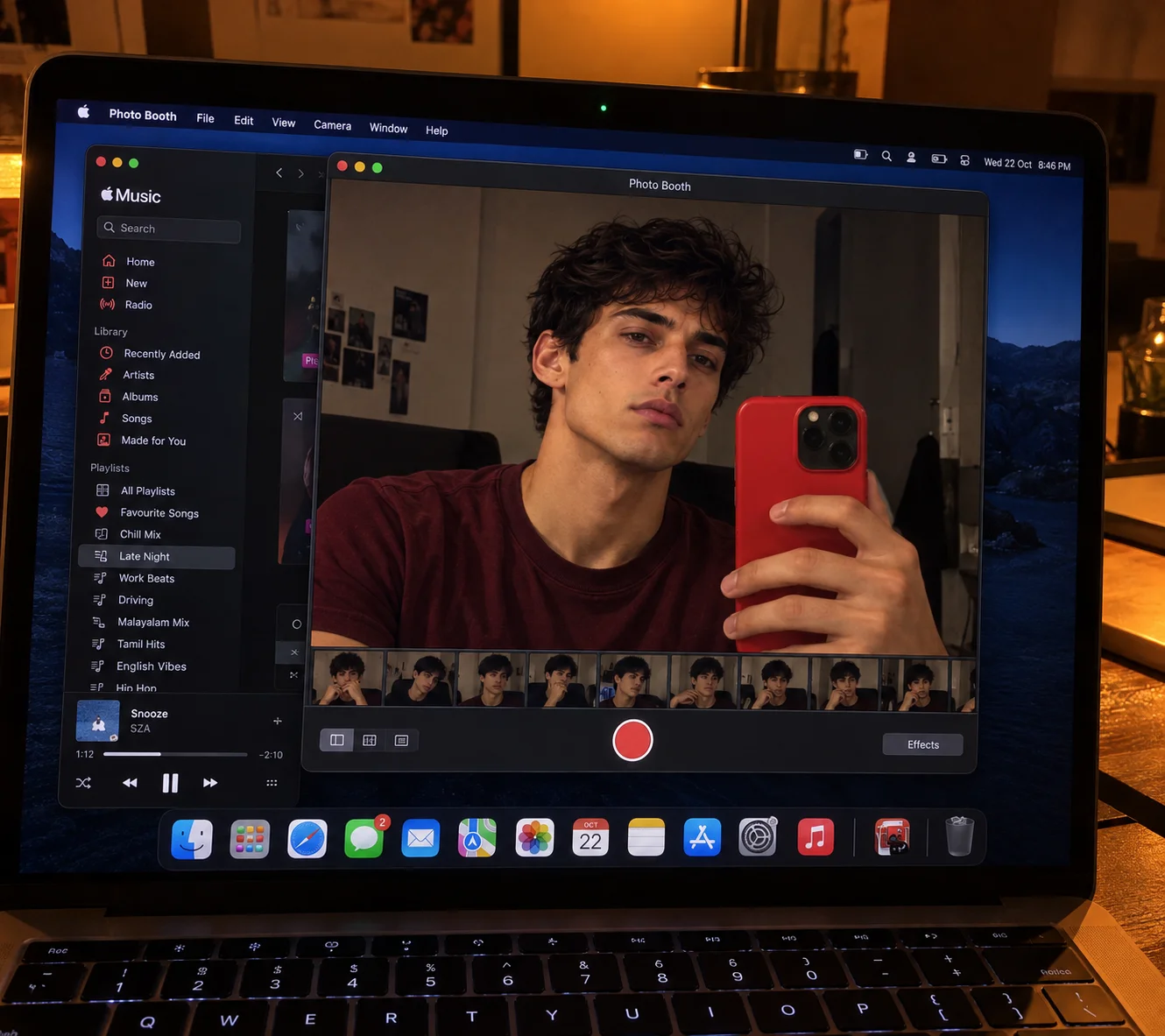

MacBook Photo Booth Selfie
Prompt: Ultra-Realistic Cristiano Ronaldo-Inspired Photo Booth Selfie — Stylish Young Man in a Burgundy T-Shirt, Red Smartphone &…
About this Prompt
“MacBook Photo Booth Selfie” is a curated uncategorized prompt crafted for ChatGPT. Designed to produce high-fidelity imagery with balanced composition and nuanced lighting, this prompt is benchmarked for rapid 1-click execution.
How to Use This Prompt
- 1Copy Prompt
Click the 1-click copy button above to copy the full prompt parameters.
- 2Launch AI Engine
Open ChatGPT directly via the launch shortcuts or in your preferred generative tool.
- 3Generate & Customize
Paste the prompt, fine-tune aspect ratio or camera angles if needed, and press generate.
Engine Syntax & Parameter Formats
Prompt: Ultra-Realistic Cristiano Ronaldo-Inspired Photo Booth Selfie — Stylish Young Man in a Burgundy T-Shirt, Red Smartphone & Authentic MacBook Photo Booth Interface

Create an extremely photorealistic, high-resolution image of a stylish young man taking a casual mirror-style selfie using the Photo Booth application on a MacBook screen. The image should look like a real photograph of a laptop display captured using a camera in a dimly lit room, combining a realistic selfie portrait with a nostalgic macOS desktop aesthetic.

Main Subject & Appearance:

A handsome young man with a sharp, masculine jawline, well-defined cheekbones, thick dark eyebrows, deep brown eyes, a straight nose, naturally textured skin, and short, neatly styled black hair with a clean fade on the sides. His overall appearance is inspired by Cristiano Ronaldo's polished athletic look, with a confident, serious expression and a subtle attitude. He wears a simple, dark burgundy-red crew-neck T-shirt with realistic cotton texture and natural fabric folds.

Pose & Facial Expression:

The subject is seated close to the camera, capturing a selfie with his smartphone. His head is slightly tilted, his face turned three-quarters toward the camera, and his eyes looking directly into the lens with a calm, confident, slightly intense expression. His lips are relaxed and closed. One hand holds a modern smartphone vertically in front of his chest, partially visible in the foreground. His fingers wrap naturally around the device, with anatomically accurate proportions and realistic skin details.

Smartphone Details:

A modern smartphone featuring a bold red protective case, a large black square camera module, and realistic reflections. The phone is positioned on the right side of the composition, partially covering his chest and shoulder. The hand holding it should be sharply detailed, with realistic knuckles, fingernails, and natural finger placement.

MacBook Photo Booth Interface:

Display the portrait inside a realistic macOS Photo Booth application window. Include the recognizable dark title bar, small red, yellow, and green window controls, a centered “Photo Booth” title, a large live camera preview, a red circular shutter button at the bottom, small effect-preview thumbnails, and an “Effects” button. Behind the Photo Booth window, show a partially visible Apple Music application with a dark sidebar, playlist names, album artwork, playback controls, and a subtle music progress bar.

Laptop & Desktop Environment:

The MacBook screen should dominate the composition, photographed at a slight diagonal angle from above. Include the black screen bezel, a small webcam area, realistic screen reflections, subtle fingerprints, and a visible macOS Dock along the bottom with recognizable colorful application icons. A portion of the black keyboard should appear in the lower foreground, with realistic keys, subtle highlights, and natural perspective distortion.

Background & Lighting:

Place the MacBook on a dark, textured wooden desk or warm brown surface in a dimly lit bedroom or cozy indoor environment. Use warm amber and orange ambient lighting, soft shadows, and a cinematic low-light atmosphere. A subtle warm light source should glow near the upper edge of the frame, creating a cozy, nostalgic aesthetic. The laptop screen should be the primary source of illumination, with warm reflections across the keyboard and surrounding surface.

Camera Composition & Photography Style:

Capture the entire scene as a real-world photograph of a MacBook screen, rather than a direct digital screenshot. Use a slightly elevated three-quarter angle, natural perspective distortion, shallow depth of field, and realistic optical softness around the laptop edges. The Photo Booth selfie should remain the sharpest and most visually prominent element. Preserve the layered composition of the desktop, overlapping application windows, screen bezel, keyboard, and desk.

Image Quality & Realism:

Ultra-photorealistic, 4K detail, realistic skin pores, natural facial proportions, lifelike eyes, authentic hair texture, anatomically correct hands, accurate smartphone geometry, realistic screen glare, subtle digital display artifacts, cinematic warm color grading, balanced contrast, soft ambient shadows, and professional lifestyle photography.

Overall Mood & Aesthetic:

Casual luxury, understated confidence, modern masculine style, warm nostalgia, authentic Apple desktop aesthetics, candid selfie photography, and a cinematic late-night atmosphere.

Negative Prompt:

Cartoon, anime, illustration, CGI appearance, plastic skin, excessive beauty filters, oversharpening, unnatural facial symmetry, distorted eyes, deformed hands, extra fingers, missing fingers, duplicated smartphone, malformed phone camera, floating objects, incorrect perspective, illegible interface text, broken application windows, fake macOS interface, excessive reflections, blown-out highlights, oversaturated colors, low resolution, pixelation, artificial facial features, and unrealistic lighting.

Important: Prioritize the complete photographed MacBook scene, the realistic Photo Booth window, the burgundy T-shirt, the red smartphone, and the subject's confident expression. Maintain the authentic appearance of a casual selfie displayed on a laptop screen. --v 6.0 --ar 16:9 --style raw --stylize 250
“When generating ‘MacBook Photo Booth Selfie’, specify an explicit lens focal length (e.g. 85mm f/1.4 for portraits, 16mm for landscapes) and natural diffused lighting. This keeps generative models from introducing excessive surface artificial smoothing.”

Comments
0