Give your photos a nostalgic makeover with these AI retro style vintage photo editing prompts. From classic 80s and 90s fashion to analog film grain, faded colors, vintage cars, and cinematic lighting, these ready-to-use prompts make it easy to create realistic old-school photos with AI.
1.90s Indian Retro BMW AI Photo Editing Prompt – Copy and Paste
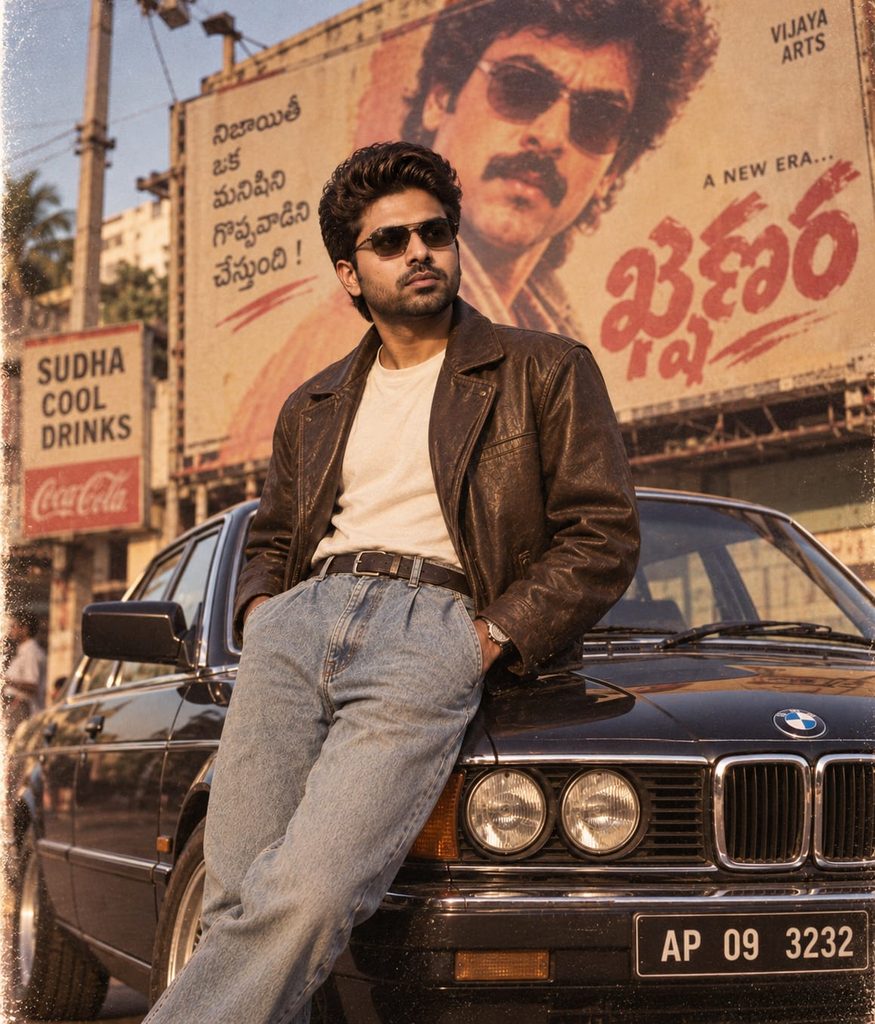
Ultra-realistic 90s Indian retro cinematic photo of the same person from the reference image, exact facial identity and features preserved, no face change, no beautification. Stylish young man wearing vintage sunglasses and authentic 90s outfit, standing confidently beside a classic old BMW, looking slightly upward. Large vintage flex billboard in the background, warm golden-hour lighting, authentic analog film grain, nostalgic 90s colors, realistic skin texture, cinematic low-angle medium-long shot, photorealistic.
Create a nostalgic 90s Indian retro photo with a classic BMW, vintage sunglasses, stylish old-school fashion, warm golden-hour lighting, and authentic analog film grain. This AI prompt creates a realistic cinematic portrait while preserving the person’s natural facial identity and features.
2.80s Indian Retro Photo AI Prompt – Copy and Paste
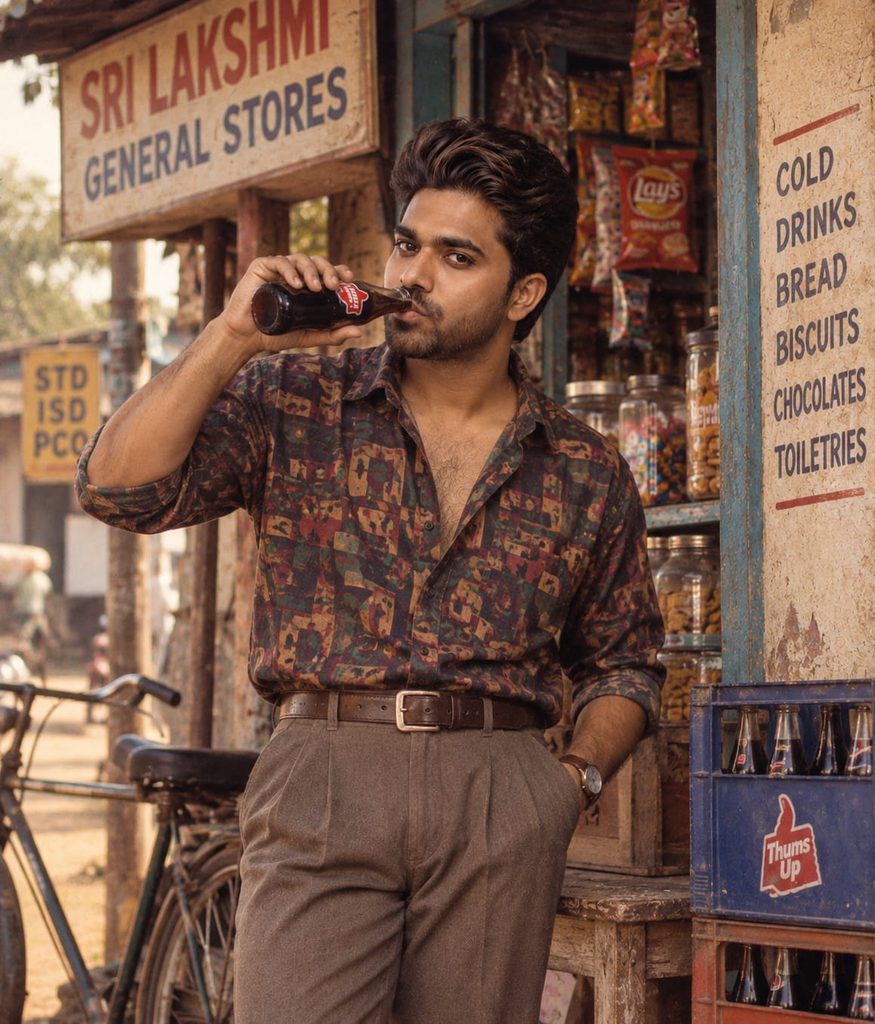
Ultra-realistic 80s Indian retro cinematic photo, same reference face preserved exactly, stylish young man in a colorful patterned retro shirt, high-waisted trousers and leather belt, casually drinking a glass-bottle cool drink outside an old roadside general store, vintage shop details, warm evening light, authentic analog film grain, nostalgic colors, realistic skin texture, cinematic medium shot.
Create a nostalgic 80s Indian retro photo featuring colorful vintage fashion, an old roadside general store, a classic glass-bottle soft drink, warm evening light, and authentic analog film grain. This prompt creates a realistic cinematic scene with natural skin texture and an authentic old-school atmosphere.
3.1980s Indian Retro Car AI Photo Prompt
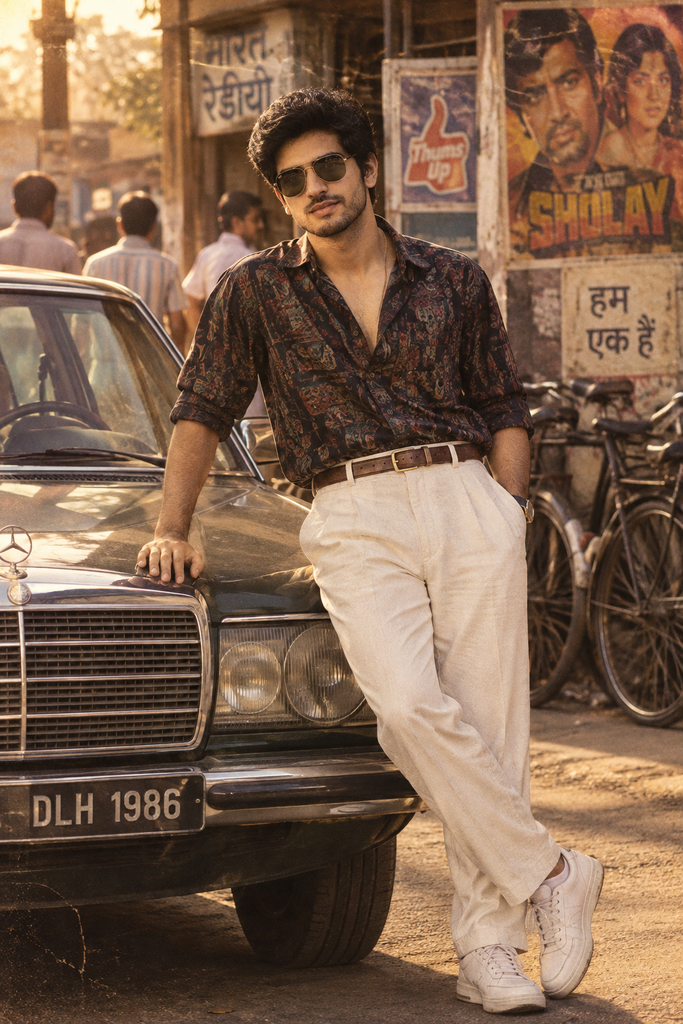
Ultra-realistic 1980s Indian retro cinematic portrait of a stylish young man leaning casually against a classic vintage car, wearing a dark patterned shirt, high-waisted cream trousers, sunglasses and white sneakers. Warm golden-hour sunlight, old Indian street with vintage posters and bicycles in the background, nostalgic Bollywood atmosphere, authentic film grain, rich vintage colors, natural skin texture, confident relaxed pose, photorealistic, cinematic photography.
Create a stylish 1980s Indian retro portrait featuring a vintage car, classic fashion, sunglasses, warm golden-hour sunlight, and an old Indian street filled with nostalgic details. This AI prompt gives your photo a realistic cinematic Bollywood-inspired look with authentic film grain and rich vintage colors.
4.90s Indian College Couple AI Prompt
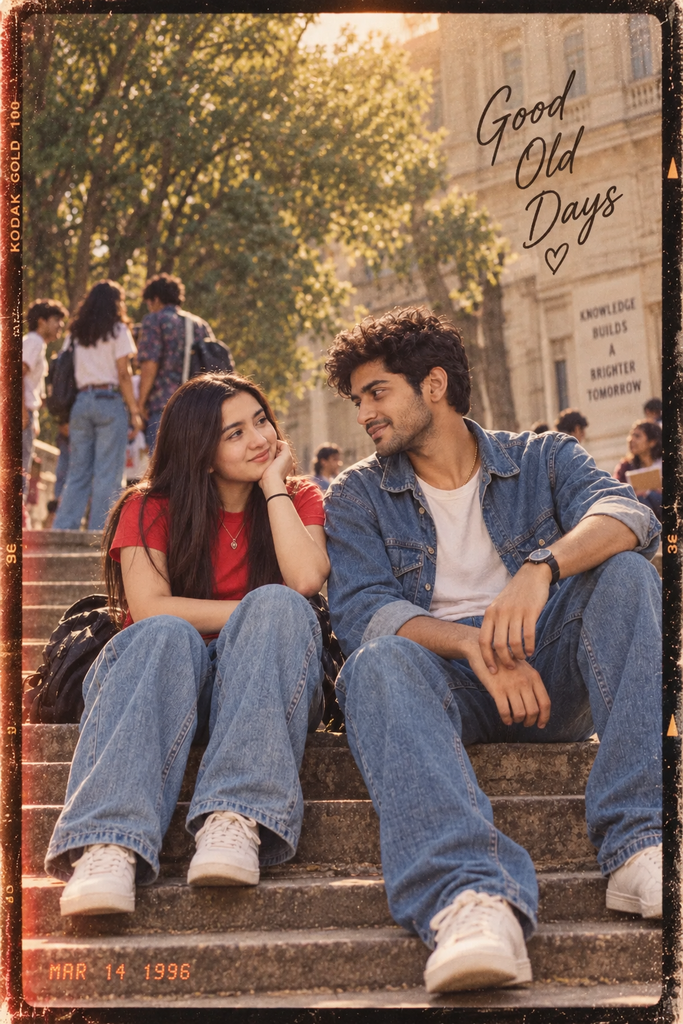
Ultra-realistic 1990s Indian college couple portrait, young man and woman sitting casually on outdoor steps, both wearing loose vintage denim outfits and white sneakers, smiling and looking at each other affectionately. College campus background with students, trees and a classic college building, warm natural sunlight, nostalgic 90s film aesthetic, authentic film grain, slightly faded colors, candid pose, photorealistic, cinematic photography.
Create a nostalgic 1990s Indian college couple photo featuring vintage denim outfits, white sneakers, a classic campus setting, natural smiles, and warm sunlight. This AI prompt creates a candid, realistic, and cinematic 90s film look with authentic grain and slightly faded colors.
5.90s Indian Retro Tea Shop AI Photo Prompt
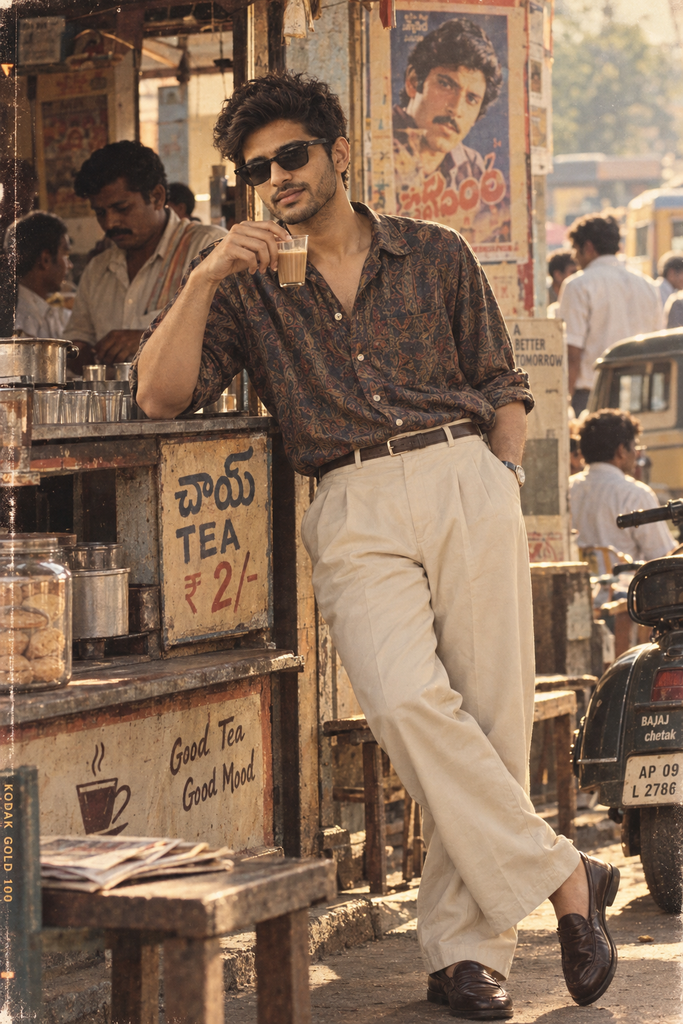
Ultra-realistic 1990s Indian retro cinematic portrait of a stylish young man casually leaning against a small roadside tea shop, holding a glass of tea, wearing a loose patterned shirt, high-waisted cream trousers, sunglasses and dark loafers. Vintage Indian street setting with old posters, scooter, tea stall, handwritten signs and people in the background, warm golden sunlight, nostalgic 90s atmosphere, authentic analog film grain, slightly faded colors, natural skin texture, relaxed confident pose, candid photorealistic photography.
Create a nostalgic 90s Indian street portrait featuring a stylish young man at a roadside tea shop, vintage fashion, classic scooter, old posters, and warm golden sunlight. This AI prompt creates a candid, realistic cinematic photo with authentic analog film grain, faded colors, and a relaxed old-school atmosphere.
About These AI Retro Style Vintage Photo Editing Prompts
These AI retro style vintage photo editing prompts are designed to transform modern photographs into nostalgic images inspired by classic film photography, vintage fashion, and different decades. Instead of applying a simple retro filter, detailed AI instructions can recreate the visual characteristics of an older photograph, including faded colors, analog film grain, natural lighting, period-inspired styling, and subtle photographic imperfections.
From a 1990s Indian street portrait to a classic Bollywood-inspired photograph or a nostalgic couple photo, these prompts can be adapted to different subjects, locations, and eras while maintaining a believable vintage appearance.
Understanding the Retro Vintage Photo Editing Style
Vintage photo editing is not limited to adding sepia tones or scratches. A convincing result combines several visual elements that naturally belong to the selected period.
The style can include analog film grain, slightly faded colors, soft highlights, gentle contrast, subtle dust, film scratches, light leaks, natural skin texture, and imperfect exposure.
For Indian retro photography, additional details such as old scooters, roadside tea stalls, vintage buildings, handwritten signs, traditional clothing, and period-appropriate hairstyles can make the scene feel more authentic.
The goal is to make the edited photograph resemble an image that was genuinely captured during that era rather than a modern photograph with a vintage overlay.
Technical Breakdown of AI Vintage Photo Editing Prompts
A strong AI editing prompt should clearly describe the subject, decade, environment, clothing, lighting, color treatment, film characteristics, and desired level of photographic imperfections.
For example, a 1990s-inspired portrait may combine warm natural sunlight, slightly faded colors, authentic analog grain, soft focus, realistic skin texture, and period-specific fashion.
When editing an existing photograph, it is also useful to specify which elements should remain visually consistent. The prompt can ask the AI to preserve recognizable facial features, natural body proportions, hairstyle details, and important elements of the original photograph while transforming the overall visual style.
Avoid adding unnecessary camera specifications unless they are actually part of the desired concept. The most important factor is creating a coherent relationship between the era, environment, styling, and film appearance.
Lighting, Colors & Vintage Film Texture
Lighting plays an important role in making a retro photograph believable.
Depending on the selected era, you can use warm golden-hour sunlight, soft window light, direct afternoon sunlight, muted studio lighting, or slightly overexposed daylight.
Popular vintage color treatments include faded warm tones, muted reds, earthy browns, cream highlights, soft greens, warm skin tones, and slightly desaturated colors.
Analog film grain should remain subtle enough to preserve important facial and clothing details. Small imperfections such as dust, scratches, slight vignetting, light leaks, and exposure variation can add authenticity when used carefully.
How to Customize These AI Retro Photo Prompts
Choose a Different Decade
You can create photographs inspired by the 1960s, 1970s, 1980s, 1990s, or early 2000s.
Change the clothing, hairstyle, architecture, colors, and accessories to match the selected period.
Change the Film Aesthetic
Experiment with classic color film, faded analog film, black-and-white photography, Polaroid-inspired images, disposable-camera aesthetics, or slightly overexposed vintage film.
Each treatment creates a different type of nostalgia.
Change the Location
Transform the setting into a retro tea shop, old cinema, railway station, vintage college campus, traditional home, roadside market, old neighborhood, or rural landscape.
Environmental details can make the selected decade much more convincing.
Change the Fashion
Try high-waisted trousers, patterned shirts, vintage denim, classic dresses, leather jackets, traditional Indian outfits, retro formalwear, or decade-specific accessories.
Matching the wardrobe to the environment helps maintain visual consistency.
Adjust the Vintage Effects
You can control the intensity of film grain, faded colors, scratches, dust, light leaks, soft focus, vignetting, and exposure imperfections.
For a realistic result, use these effects moderately rather than covering the entire image with heavy artificial textures.
Best Use Cases for AI Retro Vintage Photo Editing
These prompts are ideal for 1990s Indian photo edits, vintage couple portraits, retro Bollywood-inspired photography, old-school fashion visuals, nostalgic family-style images, vintage college photos, analog street photography, wedding-inspired portraits, cinematic posters, Instagram content, Pinterest posts, and personal photo transformations.
They are especially useful when you want to recreate the emotional character of an older photograph while keeping the image visually polished and recognizable.
For commercial projects, check the AI image platform’s licensing terms and ensure that any reference photographs, logos, or third-party assets used in the final artwork are authorized for your intended use.
Frequently Asked Questions
How do I make a photo look vintage with AI?
Upload your photo to an AI image editor and use a detailed vintage editing prompt describing the desired decade, film grain, faded colors, natural lighting, retro clothing, soft focus, and analog photo texture. You can also specify which facial and image details should remain unchanged.
What is the best AI prompt for a retro style photo?
A strong retro photo prompt should describe the era, clothing, environment, lighting, colors, film texture, and photographic imperfections. For example, you can request a 1990s analog film aesthetic with faded colors, subtle grain, warm sunlight, natural skin texture, and authentic vintage details.
Can I use AI retro style vintage photo editing prompts for free?
Yes, you can use these prompts with AI image editors that provide free image-generation or editing features. Availability, usage limits, image quality, and commercial rights depend on the specific AI platform you choose.
Can I create 80s or 90s vintage photos with AI?
Yes. Specify the decade you want and include matching fashion, hairstyles, locations, colors, film characteristics, and props. A 1990s prompt might include analog film grain, faded colors, vintage denim, old streets, scooters, and warm natural sunlight.
Can I make my photo look vintage in Photoshop using an AI prompt?
Yes. An AI-generated vintage concept can be recreated or enhanced in Photoshop using adjustments for color, contrast, grain, blur, texture, light leaks, and faded tones. The prompt can serve as a visual guide for the desired final appearance.
How do I edit a photo to look vintage without making it look fake?
Use subtle film grain, slightly faded colors, natural skin texture, soft contrast, realistic lighting, and restrained scratches or dust. Avoid excessive sepia, heavy grain, or strong artificial effects if you want the image to resemble a genuine old photograph.
What are the best AI retro photo editing prompts for couples?
Couple prompts work well when they combine natural affectionate poses with period-inspired clothing, analog film grain, warm sunlight, faded colors, and a nostalgic background. You can create vintage couple portraits inspired by the 1980s, 1990s, or early 2000s.
Can I use AI vintage photo prompts for men and boys?
Yes. You can create retro portraits for men and boys by customizing hairstyles, clothing, poses, locations, and accessories for the chosen decade. Vintage shirts, denim, high-waisted trousers, classic jackets, and old-school street settings can strengthen the retro look.
How can I create a custom vintage photo filter with AI?
Describe the exact visual characteristics you want, such as warm faded colors, muted contrast, analog grain, light leaks, soft highlights, dust, scratches, or a specific film-era appearance. Combining these details creates a more customized vintage photo effect than using a generic filter.
Can AI turn a modern photo into a vintage illustration?
Yes. Instead of requesting a photographic vintage effect, you can ask the AI to transform the image into a vintage illustration, watercolor artwork, retro poster, painted portrait, or classic comic style while preserving important elements of the original composition.