
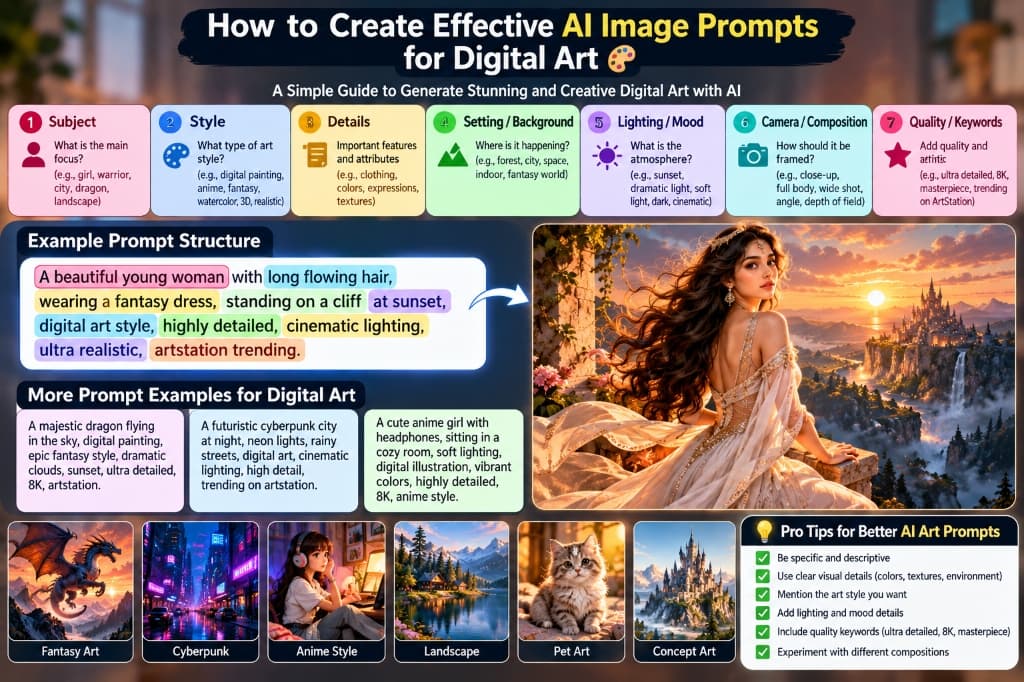
If you have ever typed “cool fantasy warrior, digital art” into Midjourney or ChatGPT and ended up with a generic, oversaturated blur that looks like a cheap mobile game asset, you are not alone.
Creating museum-grade digital art with artificial intelligence is neither random nor magical. While modern generative diffusion models like Midjourney v6.1, Flux.1 Schnell/Dev, ChatGPT (DALL-E 3), and Stable Diffusion XL possess billions of trained parameters, they require clear visual coordinates to produce coherent art. Without structured direction, the model falls back to safe, generic averages.
In this definitive guide, we break down how to create effective AI image prompts for digital art using the 7-Pillar Visual Blueprint. Whether you want to render epic fantasy illustrations, neon-soaked cyberpunk metropolises, cozy anime frames, or high-concept sci-fi character portraits, this framework will give you repeatable, professional results every single time.
What are the 7 Essential Elements of an Effective Digital Art Prompt?
An effective digital art prompt communicates directly with the neural network's latent aesthetic space through seven distinct layers:
- 1. Subject: The primary focal point of the artwork (e.g., warrior, celestial dragon, cyberpunk hacker, mythical creature).
- 2. Style: The artistic medium and visual genre (e.g., digital painting, cel-shaded anime, dark fantasy, watercolor wash, 3D Octane render).
- 3. Details: Concrete visual specifics including costume textures, color palettes, glowing runes, hair physics, and facial expressions.
- 4. Setting / Background: The world-building backdrop (e.g., crumbling gothic ruins, rainy neon alleys, enchanted bioluminescent forest).
- 5. Lighting / Mood: The illumination source and emotional resonance (e.g., golden hour rim light, volumetric god rays, gloomy chiaroscuro).
- 6. Camera / Composition: The viewing perspective and framing rules (e.g., dynamic low-angle hero shot, cinematic wide, rule of thirds, Dutch angle).
- 7. Quality / Keywords: Visual polish tokens and render engines (e.g., trending on ArtStation, ultra detailed, 8K, masterpiece).
Deconstructing the Featured Prompt Formula
The infographic at the top of this guide highlights a classic, highly effective prompt architecture that illustrates how each element stacks together seamlessly:
“A beautiful young woman with long flowing hair, wearing a fantasy dress, standing on a cliff at sunset, digital art style, highly detailed, cinematic lighting, ultra realistic, artstation trending.”
Let's dissect why this specific phrasing communicates so powerfully to diffusion transformers:
| Prompt Chunk | Core Pillar | Why It Matters to the AI Model |
|---|---|---|
A beautiful young woman with long flowing hair | Subject & Physical Features | Gives the model a clear organic subject and defines dynamic motion (flowing hair) rather than a rigid statue. |
wearing a fantasy dress | Details & Wardrobe | Anchors the theme into high-fantasy fashion, preventing modern casual t-shirts or jeans. |
standing on a cliff at sunset | Setting & Ambient Lighting | Establishes natural depth, high vantage point horizon, and rich warm orange/purple sky tones. |
digital art style | Artistic Style | Prevents the generator from defaulting to raw photography or amateur phone camera grain. |
cinematic lighting | Lighting & Atmosphere | Instructs the lighting engine to cast dynamic shadows, soft highlights, and rim illumination. |
highly detailed, ultra realistic, artstation trending | Quality & Aesthetics | Nudges the model toward high-resolution concept art portfolios curated by professional digital painters. |
Pillar 1: Subject (Who or What Takes Center Stage)
Your subject is the anchor of the whole composition. Without an unmistakable focal point, AI models get confused and clutter the image with disconnected background noise.
When choosing your subject for digital art, follow these best practices:
- Be explicit about quantity and identity: Rather than saying “warriors”, say “a lone cybernetic samurai warrior holding a glowing katana”.
- Specify posture or dynamic action: Static characters look stiff. Add active verbs: “crouched on a skyscraper ledge”, “mid-leap over roaring flames”, or “gazing pensively into an ancient grimoire”.
- Scale and proportion: For creature art, establish size relationships: “a colossal celestial dragon winding through towering mountain peaks”.
Pillar 2: Art Style (Digital Painting, Anime, 3D, Fantasy)
The term “digital art” covers a vast universe of distinct sub-genres, rendering techniques, and visual traditions. Leaving the style blank leaves your generation to the whim of random seed bias.
Here are the most reliable digital art style descriptors to test:
| Style Token | Visual Character | Best For |
|---|---|---|
digital painting, concept art | Visible textured brushstrokes, painterly highlights, rich tonal gradients. | Fantasy environments, epic character art, video game loading screens. |
anime illustration, cel-shaded | Clean line art, vibrant flat colors, expressive eyes, dynamic hair clumps. | Light novel covers, character design sheets, webtoon art. |
3D render, Octane Render, Unreal Engine 5 | Ray-traced reflections, volumetric subsurface scattering, physical materials. | Sci-fi mechs, cyberpunk vehicles, hard-surface armor, futuristic gadgets. |
watercolor digital wash, ink splash | Soft paper bleeding, spontaneous translucent layers, black ink calligraphy borders. | Poetic character portraits, nature sketches, emotive book illustrations. |
dark fantasy, gothic oil digital painting | Deep shadows, muted earthen tones, grim atmosphere, baroque ornamentation. | Souls-like bosses, haunted castle ruins, necromancer sorcery. |
Pillar 3: Visual Details (Textures, Clothing & Expressions)
Details are what breathe life and personality into an illustration. While general keywords outline the shape, fine details separate generic stock renders from unforgettable digital art.
- Wardrobe & Armor: Describe materials explicitly: “ornate filigree gold armor”, “weathered brown leather trench coat with brass buckles”, or “iridescent silk embroidered with floral patterns”.
- Micro-Textures: Add tactile cues such as “brushed titanium with battle scratches”, “crackling magical runes etched into skin”, or “wet translucent rain ripples”.
- Facial Expression: Emotions convey story. Replace blank stares with “a fierce determined grimace”, “a gentle nostalgic smile”, or “a cold calculated glare with eyes glowing electric cyan”.
Pillar 4: Setting & Environment (Atmosphere & World-Building)
An empty background drains energy from the artwork. By anchoring your subject inside a believable environment, you establish scale, depth, and narrative context:
- Depth Planes: Establish foreground, midground, and background elements (e.g., “cherry blossom petals falling in foreground, warrior in midground, misty pagoda mountains in far background”).
- Environmental Storytelling: Include environmental interactions: “standing on rain-slicked asphalt reflecting holographic billboards” or “perched on ancient mossy stone ruins crumbling into a misty canyon”.
- Weather & Particles: Add atmospheric particles to create cinematic density: “floating ember sparks, drifting autumn leaves, soft morning fog, heavy snowfall”.
Pillar 5: Lighting & Mood (Illumination & Tone)
Lighting is the single most decisive factor in determining whether an image feels flat or visually breathtaking. It defines form, provides three-dimensional contrast, and establishes emotional gravity.
| Lighting Term | Visual Effect & Atmosphere |
|---|---|
golden hour rim lighting | Separates character silhouettes from backgrounds with a glowing golden halo effect. |
volumetric god rays, atmospheric haze | Beams of sunlight cutting through dust or mist; creates grandeur, reverence, and scale. |
neon ambient glow, dual-tone lighting (magenta & cyan) | Classic cyberpunk contrast; casts complementary saturated lights on opposing sides of the subject. |
bioluminescent soft glow | Ethereal fantasy lighting radiating from magical flora, fungi, or enchanted creatures in night scenes. |
dramatic chiaroscuro, high contrast side lighting | Deep baroque shadows with intense razor-sharp highlights; evokes psychological tension and mystery. |
Pillar 6: Camera & Composition (Framing, Angles & Depth)
Even in 2D digital painting, generative models understand virtual cameras. Borrowing compositional terms from cinematography and fine art directs the viewer's eye right to the climax of the piece:
- Dynamic Low-Angle Shot: Looking upward at the subject makes characters look imposing, monumental, and heroic.
- Wide-Angle Panoramic Shot: Ideal for sweeping fantasy vistas, colossal mecha battles, or sprawling futuristic cityscapes.
- Close-Up Portrait / Bust Shot: Focuses all computational detail on facial realism, eye reflections, and intricate hair styling.
- Rule of Thirds & Leading Lines: Places the subject off-center along natural visual focal points, creating balanced, professional compositions.
- Shallow Depth of Field (Bokeh): Blurs the background softly, giving the foreground character maximum punch and visual separation.
Pillar 7: Quality Modifiers & Keywords (What Works in 2026)
Historically, early diffusion models like Stable Diffusion 1.5 relied heavily on keywords like “8K, photorealistic, trending on ArtStation, masterpiece” to nudge the generation away from low-resolution training data.
In modern models like Midjourney v6.1, Flux.1, and DALL-E 3, these tokens still serve a key purpose: they act as aesthetic cluster triggers. Rather than literally altering resolution, they guide the model toward concept artist portfolios, premium illustration platforms, and clean rendering pipelines:
artstation trending: Nudges the artwork toward polished concept art with professional color theory and compositional balance.highly detailed, intricate textures: Encourages the engine to render fine embroidery, armor filigree, and ambient background props.matte painting, key visual: Evokes production-grade cinematic environment paintings used in blockbuster film and AAA game concept art.- Modern Best Practice: Combine quality tokens with concrete lighting and material descriptors. Descriptive words (e.g., “subsurface scattering on skin, brushed brass reflections”) outperform generic hype words every time.
6 Tested Copy-Paste Digital Art Prompts
Here are six fully tested, production-ready prompts spanning the most popular digital art categories. Each prompt is structured using our 7-Pillar framework and is ready to copy and paste directly into Midjourney, ChatGPT, or Flux:
“A majestic dragon flying in the sky, digital painting, epic fantasy style, dramatic clouds, sunset, ultra detailed, 8K, artstation.”
“A futuristic cyberpunk city at night, neon lights, rainy streets, digital art, cinematic lighting, high detail, trending on artstation.”
“A cute anime girl with headphones, sitting in a cozy room, soft lighting, digital illustration, vibrant colors, highly detailed, 8K, anime style.”
“Breathtaking fantasy landscape with floating crystal islands, cascading waterfalls into clouds, mystical twilight skies, vibrant luminous flora, digital concept art, matte painting, highly detailed, 8K.”
“A whimsical celestial baby fox with glowing fur and starlight eyes, nestled inside a giant glowing mushroom forest, digital painting, storybook fantasy art, soft rim light, 8K, trending on ArtStation.”
“Heavy cybernetic armor warrior standing amid smoke and sparks, mechanical exosuit, visor reflection, cinematic low angle, gritty digital art, octane render, dynamic lighting, masterpiece.”
Comparison: Weak Prompt vs. 7-Pillar Structured Prompt
To see why prompt engineering makes such a colossal difference, compare what happens when you give an AI generator a primitive 3-word prompt versus a structured prompt built using our blueprint:
| Criteria | The Weak Prompt | The 7-Pillar Structured Prompt |
|---|---|---|
| Prompt Text | “dragon in sky, fantasy” | “A majestic dragon flying in the sky, digital painting, epic fantasy style, dramatic clouds, sunset, ultra detailed, 8K, artstation” |
| Composition | Awkwardly centered, flat 2D silhouette with no depth of field. | Dynamic diagonal flight path cutting through multi-layered volumetric storm clouds. |
| Color Palette | Muddled gray and muddy greens with zero atmospheric scattering. | Rich complementary palette of sunset ambers, deep violets, and glowing underbelly scales. |
| Texture & Lighting | Plastic-looking skin without scale definition or specular highlights. | Crisp serpentine scales catch golden hour rim light; wings catch translucent subsurface glow. |
| Consistency | Roll the dice every generation—results fluctuate wildly between cartoons and CGI blobs. | Predictable, magazine-quality digital painting style across seeds and aspect ratios. |
Pro Tips for Polished Digital Art
Follow these golden rules distilled from analyzing thousands of top-performing prompts across our community:
1. Be Specific & Descriptive
Don't just type “art”. Specify the medium: “digital matte painting”, “concept character illustration”, or “cel-shaded vector artwork”.
2. Define Colors & Textures
Name specific palettes like “vaporwave cyan and neon magenta”, “muted autumnal earth tones”, or “monochromatic charcoal with crimson accents”.
3. Establish Mood & Atmosphere
Light gives emotion. Use words like “nostalgic morning warmth”, “gloomy apocalyptic rain”, or “serene ethereal bioluminescence”.
4. Experiment With Aspect Ratios
Square (1:1) is limiting. Use wide aspect ratios like --ar 16:9 for sweeping landscapes or tall --ar 9:16 for character portraits and phone wallpapers.
Tailoring Prompts for Midjourney v6 vs. Flux.1 vs. ChatGPT (DALL-E 3)
Different AI engines respond to different prompt syntaxes. Here is how to adapt our 7-Pillar blueprint to the leading platforms:
Midjourney v6.1 & Niji 6
Midjourney excels with comma-separated descriptors, artistic mediums, and style parameters. For digital art, consider adding --stylize 250 for artistic flair, or --niji 6 if you are targeting anime and Japanese illustration styles.
Flux.1 (Schnell & Dev)
Flux uses state-of-the-art flow transformers that excel with natural conversational English rather than random comma tags. Frame your prompt as a continuous descriptive sentence describing lighting physics, surface textures, and camera placement.
ChatGPT (DALL-E 3)
DALL-E 3 automatically expands your prompt into a full paragraph. To keep it focused on digital art, explicitly start with: “A digital concept art illustration of... do not make this a photograph.” This prevents the engine from converting your painting into a photo.
Frequently Asked Questions (FAQ)
What is the best prompt formula for AI digital art?
The most reliable formula is: [Subject + Details] + [Setting/Background] + [Art Style] + [Lighting & Atmosphere] + [Camera/Composition] + [Quality Keywords]. For example: “A majestic dragon flying in the sky, digital painting, epic fantasy style, dramatic clouds, sunset, ultra detailed, 8K, artstation.”
Why do my AI digital art images look like 3D plastic or blurry cartoons?
This occurs when prompts lack lighting and texture definitions. Without instructions like “brush strokes, matte painting, textured linen, volumetric rim light”, the model uses default smooth shading that results in plastic-looking character surfaces.
Does adding “trending on ArtStation” still work in 2026?
Yes, but its behavior has evolved. In modern engines, it acts as a style anchor rather than a quality booster. It tells the neural network to reference digital concept art, character sheets, and video game illustration aesthetics rather than generic consumer photos.
Can I use negative prompts for digital art?
Yes! Negative prompts (like --no photo, blurry, bad anatomy, watermark, text in Midjourney or negative prompt boxes in Stable Diffusion) prevent photographic textures and artifacts from creeping into your illustrated digital paintings.
Ready to Create and Share Your Digital Art?
Now that you have the 7-Pillar formula, explore hundreds of curated prompts across our platform or publish your own prompt recipes to inspire our global community:
Comments & Discussion 0
Join the conversation, ask questions about this guide, or share your AI creations.
No comments yet
Be the first to share your thoughts, tips, or ask a question!