Cinematic street portrait Midjourney prompt helps create ultra realistic urban fashion photography with cinematic lighting, shallow depth of field, creamy bokeh, and photorealistic details.
AI Image Prompt Generator
AI Image Prompt
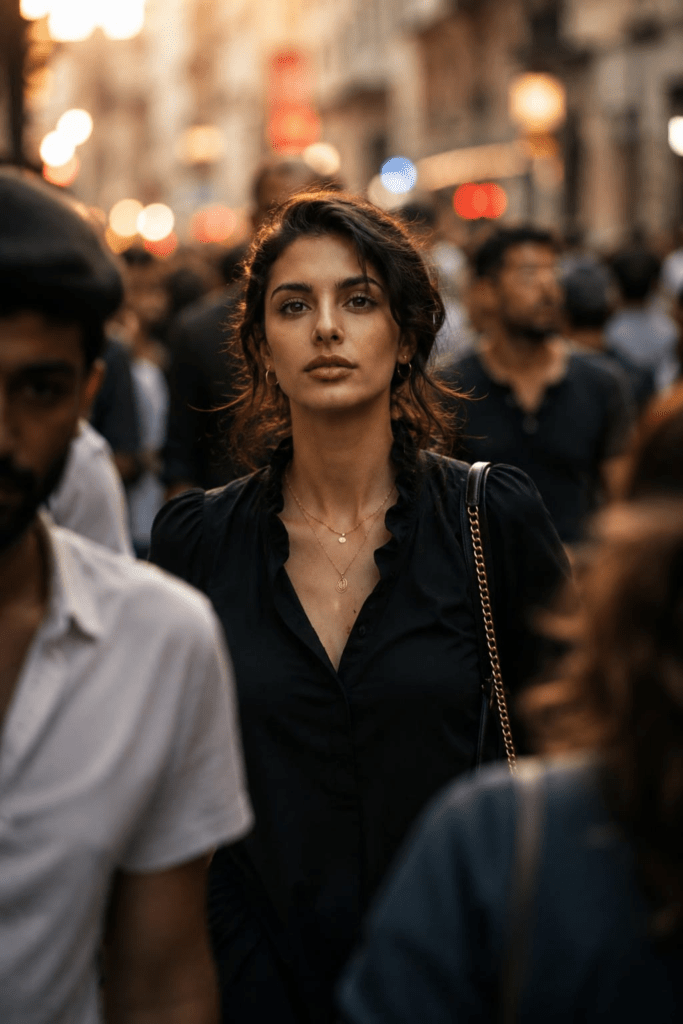
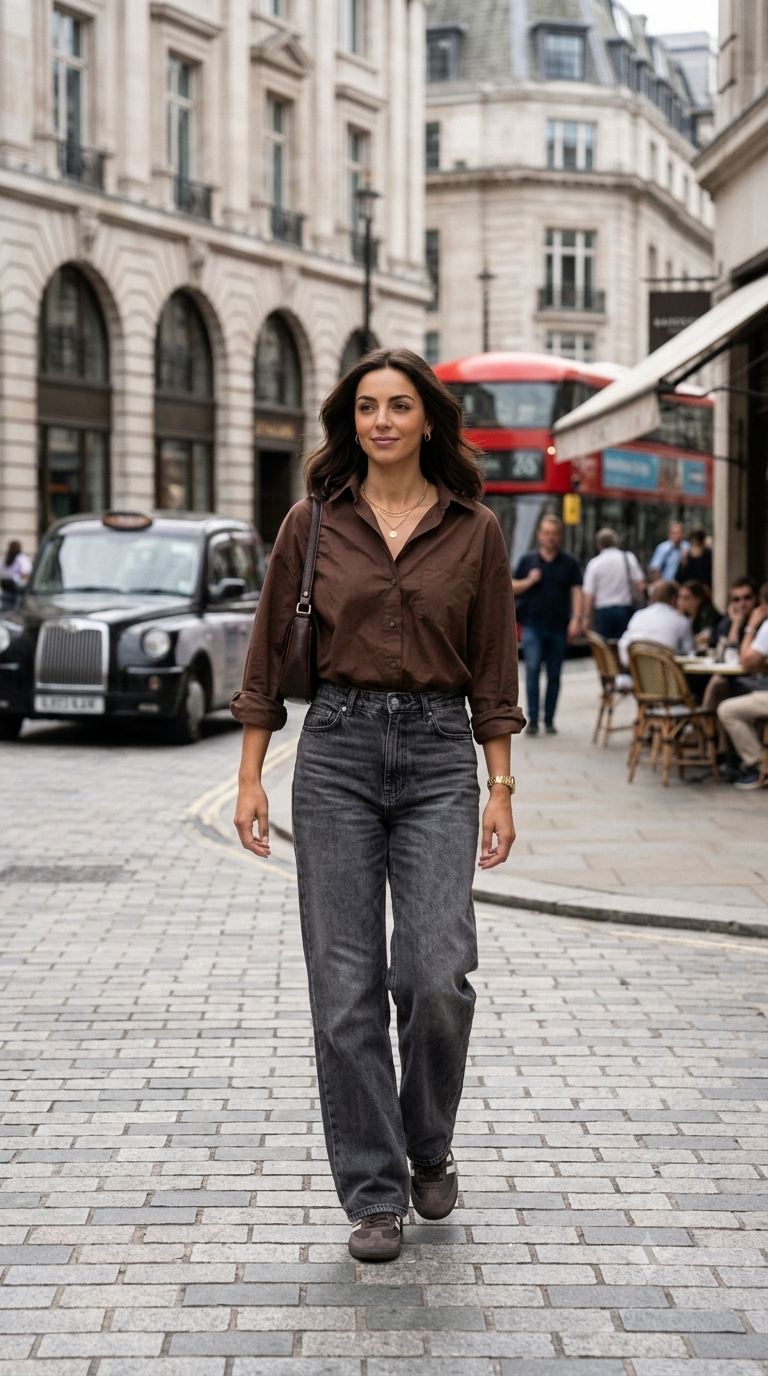
Ultra-realistic cinematic street portrait of a stunning young woman walking through a crowded urban city street during golden hour, captured in a candid telephoto composition with shallow depth of field. She is positioned perfectly in focus at the center of a busy crowd while surrounding people appear naturally motion-blurred and out of focus, creating a dreamy cinematic isolation effect.
She has soft glowing skin, symmetrical facial features, expressive hazel eyes, full natural lips, and dark brown hair tied loosely in a messy low bun with delicate strands framing her face. Her expression is calm, thoughtful, and slightly curious while looking forward through the crowd.
She is wearing a stylish black blouse with subtle ruffle details, layered minimalist gold necklaces, elegant earrings, and a luxury black leather shoulder bag with a gold chain strap.
The environment is a bustling European-style city street with colorful bokeh lights, blurred pedestrians, storefronts, and soft urban ambience in the background. Foreground subjects partially frame the shot with cinematic blur for depth and realism.
Shot on a full-frame Sony A7R IV with an 85mm f/1.2 lens, ultra shallow depth of field, creamy bokeh, natural skin texture, cinematic color grading, teal and warm orange tones, soft ambient lighting, realistic shadows, high detail, editorial fashion photography style, luxury lifestyle aesthetic, atmospheric urban storytelling, 8K ultra-detailed, photorealistic, movie still quality.
📋 How to use:
1. Click any AI button below (prompt auto-copies to clipboard)
2. ChatGPT / Gemini / DALL·E: Upload your reference photo 📎 → paste prompt → Send!
3. Midjourney: Upload photo to Discord → copy image link → use /imagine → paste prompt → add --cref YOUR_IMAGE_URL --cw 100 at end
This prompt is designed to create a cinematic street portrait where a single woman becomes the visual focus within a crowded urban environment. Rather than removing the surrounding crowd, the composition uses it as an important storytelling element. Pedestrians, storefronts, and city lights remain present but become visually softer, creating the impression that the subject has become momentarily isolated from the busy world around her.
Her styling combines understated luxury with everyday urban fashion. The black blouse, delicate gold jewelry, and black leather shoulder bag create a sophisticated appearance without making the character look excessively dressed for the street. Her loosely tied hair and calm expression add a natural, candid quality.
The European-style city environment contributes atmosphere through colorful lights, storefronts, and movement. The concept works particularly well because stillness and motion exist in the same frame: the woman remains sharply defined while people around her appear blurred. This contrast creates a visual story about an individual moment within a constantly moving city.
Understanding the Visual Style
The visual style combines cinematic street photography, luxury lifestyle photography, editorial fashion portraiture, and candid urban storytelling. The image is designed to feel like a carefully captured moment rather than a conventional posed fashion photograph.
The telephoto portrait approach compresses the busy surroundings visually, while shallow depth of field separates the woman from the crowd. Motion blur introduces movement and gives the image the atmosphere of a movie still.
The warm-and-cool color treatment adds another cinematic layer. Warm golden-hour illumination works alongside cooler urban tones, producing a sophisticated contemporary appearance while retaining the natural character of a city street.
Technical Prompt Breakdown
The prompt specifies a full-frame Sony A7R IV paired with an 85mm f/1.2 lens. The 85mm focal length is well suited to portraiture because it allows the subject to be framed prominently while retaining environmental context. The f/1.2 aperture creates an extremely shallow depth of field, helping separate the woman from the surrounding crowd.
The prompt also calls for creamy bokeh, meaning out-of-focus light sources and background details should appear softly blurred rather than sharply defined. This is particularly effective for the colorful city lights.
Motion blur is intentionally applied to surrounding pedestrians, while the main subject remains sharply focused. Foreground people partially entering the frame provide another layer of depth.
The camera and lens specifications are explicitly supplied in the prompt, so they can be retained when using a generator that responds to photographic references.
Lighting, Colors & Composition
Golden-hour lighting provides the main natural illumination, giving the woman’s skin a warm, flattering appearance. Soft ambient urban light adds additional illumination from the surrounding environment without overpowering the subject.
The prompt uses a teal-and-warm-orange color treatment, creating contrast between cooler environmental tones and warmer highlights. This combination contributes to the cinematic movie-still aesthetic.
Compositionally, the woman is positioned centrally and kept sharply focused. The surrounding crowd forms a moving frame around her, while foreground pedestrians create additional depth. The blurred people and storefronts also prevent the background from competing with her face.
The combination of central framing, shallow depth of field, motion blur, and bokeh creates the distinctive isolation effect that defines the concept.
How to Customize This Prompt
Change the Location
Replace the European-style street with a Tokyo crossing, Parisian boulevard, New York avenue, old-town alley, modern shopping district, or quiet urban neighborhood. The location can change the cultural and visual personality of the scene.
Change the Time of Day
Golden hour can be replaced with blue hour, early morning, rainy evening, or nighttime. Blue hour can create a cooler cinematic mood, while rain can introduce reflections and additional atmospheric depth.
Change the Outfit
Replace the black blouse with a tailored blazer, trench coat, knit sweater, elegant dress, or contemporary streetwear. Keep the accessories understated if you want the image to retain its luxury lifestyle character.
Adjust the Crowd Movement
Increase the amount of motion blur for a more energetic city atmosphere, or reduce it for a calmer editorial image. You can also have pedestrians crossing in different directions to make the environment feel more spontaneous.
Change the Color Grade
The teal-and-orange treatment can be replaced with muted monochrome, warm amber, cool blue, or neutral cinematic grading. A restrained palette can make the portrait feel more sophisticated and less stylized.
Best Use Cases
This cinematic street portrait works well for fashion editorials, Instagram and Pinterest content, lifestyle campaigns, travel-inspired artwork, creative portfolios, blog imagery, urban photography concepts, and cinematic mood boards. It is especially useful when the goal is to combine fashion with an authentic city atmosphere. For commercial projects, verify the AI generator’s licensing terms and ensure any recognizable brands, locations, logos, or third-party assets are appropriately licensed.