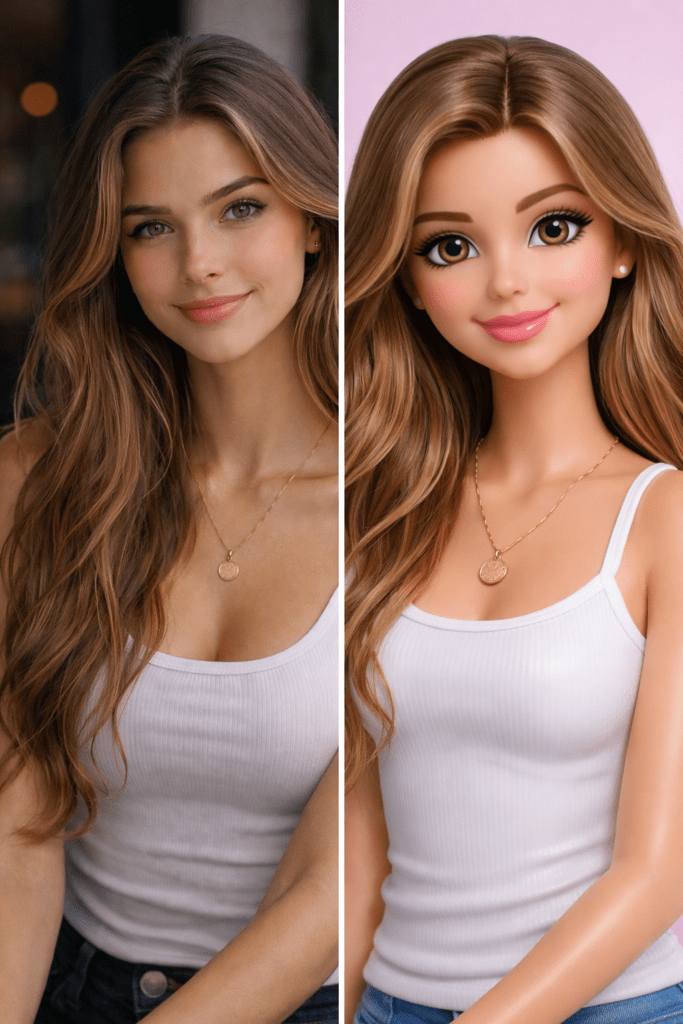
Create a split-screen vertical 9:16 image with two panels. LEFT PANEL: Use the uploaded reference photo as-is, realistic, natural lighting, original proportions, no stylization. RIGHT PANEL: Create a stylized 3D Barbie-inspired doll portrait based on the same person. Maintain facial resemblance while slightly idealizing proportions. Smooth soft-plastic toy-like skin texture, glossy flawless finish. Large expressive eyes, cute semi-realistic facial features, friendly smile. Pastel color palette, soft studio lighting, gentle highlights and smooth gradients. Hair should be sculpted, neatly styled, slightly glossy and voluminous. Outfit should match the reference image but appear molded and simplified like a fashion doll. Clean minimal studio background, soft shadows. High-quality 3D render, modern animated Barbie aesthetic. Bright, cheerful, clean and playful look.
About This AI Image Prompt
This AI image prompt creates a split-screen 9:16 comparison portrait showing the original reference photograph on the left and a stylized 3D fashion-doll interpretation of the same person on the right.
The left panel remains completely realistic and unchanged, while the right panel transforms the subject into a polished, playful Barbie-inspired 3D doll aesthetic.
Understanding the Visual Style
The visual style combines realistic photography and premium 3D collectible-doll rendering.
The right panel should preserve recognizable facial resemblance while gently idealizing the proportions. Large expressive eyes, a friendly smile, smooth toy-like skin, glossy hair, and simplified fashion-doll clothing create the stylized appearance.
The result should feel like a high-quality modern animated fashion-doll render rather than a flat cartoon illustration.
Split-Screen Composition
Left Panel — Original Photograph
Use the uploaded reference image as-is.
Preserve:
- Original facial features
- Natural proportions
- Original hairstyle
- Original clothing
- Natural skin texture
- Original lighting
- No stylization
- No beauty transformation
The left side should clearly represent the authentic source photograph.
Right Panel — 3D Doll Transformation
Create a stylized 3D doll version of the same person.
Preserve recognizable facial characteristics while introducing:
- Larger expressive eyes
- Slightly idealized proportions
- Smooth soft-plastic skin
- Glossy flawless finish
- Cute semi-realistic facial features
- Friendly smile
- Sculpted voluminous hair
- Simplified molded clothing
The outfit should visually correspond to the reference image while appearing constructed from premium fashion-doll materials.
Technical Prompt Breakdown
Use a vertical 9:16 composition divided into two clean panels.
The two panels should align naturally so the comparison feels intentional and balanced.
The right-side doll should have realistic 3D geometry, clean facial modeling, smooth transitions, subtle material reflections, and carefully sculpted hair.
The skin should resemble soft matte-to-gloss toy plastic, rather than human skin.
The hair should appear molded and sculpted with defined flowing shapes and subtle glossy highlights.
Lighting, Colors & Composition
The right panel uses soft studio lighting with gentle highlights and smooth gradients.
Use a cheerful pastel palette with soft pinks, creams, light blues, lavender, and other subtle fashion-doll colors where appropriate.
The background should remain clean and minimal, with soft shadows beneath or around the doll.
The left panel should retain its original photographic appearance, while the right panel should have the polished lighting and material quality of a premium 3D render.
How to Customize This Prompt
Change the Doll Style
Try luxury collectible doll, porcelain fashion doll, cute animated doll, realistic toy photography, miniature figurine, or premium designer doll.
Change the Background
Use pastel pink, clean white studio, soft lavender, toy-room environment, fashion showroom, or minimalist gradient.
Change the Outfit
Keep the original outfit or transform it into a couture gown, casual streetwear, princess-inspired outfit, luxury suit, or pastel fashion-doll ensemble.
Change the Expression
Try a gentle smile, playful wink, confident expression, surprised look, or cheerful laughing expression while preserving the recognizable facial identity.
Best Use Cases
This concept works especially well for Instagram before-and-after posts, AI transformation artwork, profile-picture concepts, personalized doll portraits, fashion content, social-media trends, collectible-character concepts, and playful 3D avatar designs. The side-by-side composition makes the transformation immediately clear while preserving the connection between the real photograph and the stylized doll version.