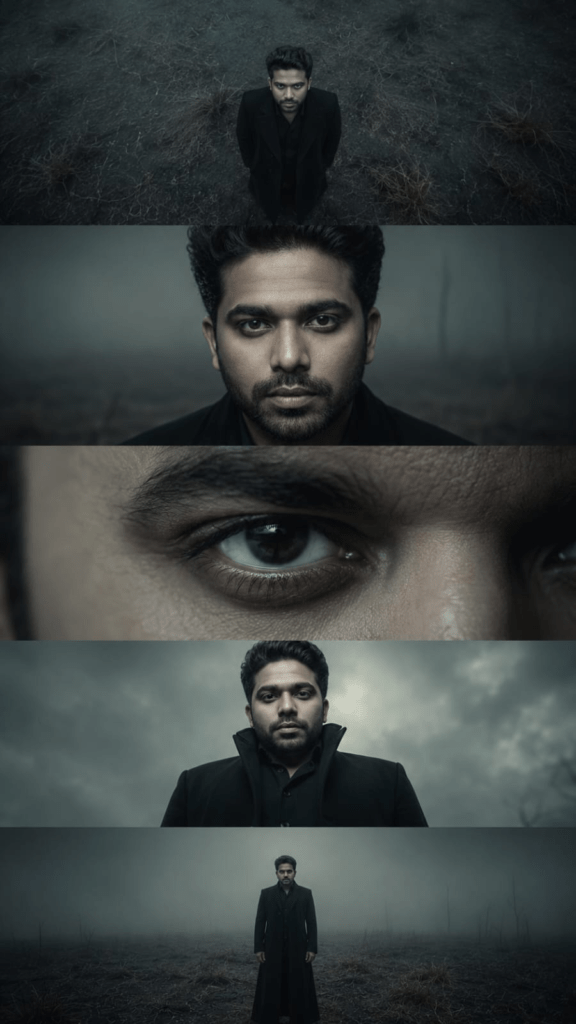
Ultra-realistic cinematic dystopian storyboard sequence featuring the exact same male face identity preserved consistently across all frames, standing alone in a foggy barren wasteland, moody sci-fi thriller atmosphere, South Asian male with sharp facial features, styled dark hair, subtle beard, intense emotionless expression, wearing a premium matte black futuristic long coat with high collar, desaturated teal-gray cinematic color grading, atmospheric haze, dead grass field, premium Hollywood production aesthetic.
Shot sequence: Shot 1 – CRANE DOWN: dramatic aerial top-down crane shot, subject standing alone in dead grass field, centered composition, vast cinematic negative space, ominous environment, identity perfectly preserved.
Shot 2 – CLOSE-UP PORTRAIT: hyper-detailed close-up portrait, direct eye contact, realistic skin pores, subtle facial shadows, cinematic lens compression, exact facial identity match.
Shot 3 – EXTREME CLOSE-UP (ECU): macro cinematic close-up of one eye, ultra-detailed eyelashes, realistic skin texture, dark iris reflections, photorealistic detail, same identity preserved.
Shot 4 – LOW ANGLE HERO SHOT: dramatic low-angle perspective, subject looking down with dominant presence, foggy stormy sky background, fashion editorial composition, exact face consistency.
Shot 5 – DOLLY OUT FULL BODY: symmetrical full-body shot pulling backward, isolated subject in misty wasteland, environmental storytelling, atmospheric depth, exact same person.
Camera settings: ARRI Alexa cinematic look, anamorphic lens, 85mm + 50mm + macro lens mix, shallow depth of field, realistic motion blur, subtle film grain, HDR, ultra photorealistic, 8K masterpiece.
Style keywords: cinematic storyboard, sci-fi thriller, moody dystopian atmosphere, hyper realism, Hollywood film still, dramatic composition, identity lock, face consistency.
Aspect ratio: 9:16 vertical multi-panel storyboard.
📋 How to use:
1. Click any AI button below (prompt auto-copies to clipboard)
2. ChatGPT / Gemini / DALL·E: Upload your reference photo 📎 → paste prompt → Send!
3. Midjourney: Upload photo to Discord → copy image link → use /imagine → paste prompt → add --cref YOUR_IMAGE_URL --cw 100 at end
This prompt is designed to create a cinematic dystopian storyboard following one male character through a sequence of increasingly intimate and dramatic camera perspectives. The character stands alone in a barren wasteland, surrounded by fog, dead grass, and an ominous atmosphere. Rather than relying on multiple characters or complex action, the concept builds tension through isolation, environment, facial expression, and changing camera distance.
The character’s matte black futuristic coat and high collar establish a recognizable silhouette that fits the science-fiction setting. His emotionless expression creates mystery, suggesting a story or conflict that exists beyond the individual frames. The desaturated teal-gray treatment reinforces the cold, lifeless feeling of the wasteland.
The five defined shots work together like visual storytelling beats. The aerial opening establishes isolation and scale, the portrait introduces the character emotionally, the extreme eye close-up increases intimacy, the low-angle view gives him authority, and the final full-body shot returns attention to the environment. Consistent facial identity connects all of these perspectives into one character journey.
Understanding the Visual Style
The visual style combines dystopian science fiction, cinematic thriller photography, storyboard composition, and fashion-editorial imagery. Its restrained color treatment avoids a colorful futuristic aesthetic and instead creates a colder, more serious atmosphere.
The barren landscape and atmospheric fog provide environmental storytelling, while the futuristic coat gives the character a contemporary sci-fi identity. The cinematic Hollywood influence comes from the dramatic camera perspectives, controlled lighting, atmospheric depth, and film-inspired texture.
The sequence also has a strong editorial quality. The low-angle hero shot and carefully styled clothing could function as fashion imagery on their own, while the surrounding wasteland transforms the same character into part of a larger fictional narrative.
Technical Prompt Breakdown
The prompt contains several explicit camera and photographic instructions. It references an ARRI Alexa cinematic look, an anamorphic lens aesthetic, and a combination of 85mm, 50mm, and macro lenses. These choices correspond to different visual purposes within the sequence rather than one fixed camera setup.
The 85mm and 50mm perspectives are suited to portrait-oriented and character-focused shots, while the macro lens is specifically relevant to the extreme close-up of the eye. Shallow depth of field helps isolate the subject or facial details from the environment.
The prompt also includes realistic motion blur, subtle film grain, and HDR. Motion blur can communicate movement during camera motion, film grain introduces a film-like texture, and HDR emphasizes a broad range of bright and dark detail.
The 9:16 vertical multi-panel storyboard establishes the overall presentation format. The identity-lock instruction is especially important because the character must remain recognizable across substantially different framings.
Lighting, Colors & Composition
The visual palette is dominated by desaturated teal and gray, creating a cold and lifeless atmosphere appropriate for the barren setting. This restrained color treatment keeps attention on the character instead of allowing the environment to become visually distracting.
The opening crane-down shot uses vast negative space to make the character appear small and isolated. The close-up then reverses that relationship by filling the frame with his face. The extreme close-up of the eye pushes the viewer even closer, emphasizing emotion and detail.
The low-angle shot changes the character’s visual authority, making him appear more imposing against the stormy sky. Finally, the dolly-out full-body shot restores environmental scale and allows the viewer to appreciate the loneliness of the wasteland.
Fog and atmospheric haze connect the foreground and background, creating depth while maintaining the mysterious mood.
How to Customize This Prompt
Change the Environment
Replace the barren wasteland with an abandoned city, ruined industrial complex, frozen landscape, flooded metropolis, or desert settlement. Each environment can suggest a different type of dystopian story while preserving the same shot structure.
Change the Color Grade
The teal-gray treatment can be replaced with muted brown, cold blue, charcoal monochrome, or subtle green-gray tones. Warmer desaturated colors could suggest a harsher desert world, while blue-gray tones emphasize isolation and coldness.
Change the Character’s Wardrobe
Replace the futuristic long coat with tactical clothing, a weathered survival jacket, armored outerwear, or minimalist dystopian fashion. The clothing can communicate whether the character is a survivor, leader, investigator, or traveler.
Modify the Camera Sequence
You can replace the crane-down opening with a distant wide shot or begin with the extreme eye close-up to create immediate mystery. Changing the sequence can alter how quickly the viewer discovers the character and environment.
Change the Atmosphere
Experiment with rain, blowing dust, snow, ash, smoke, or stronger atmospheric fog. Environmental particles can change the emotional tone while adding movement to otherwise static compositions.
Best Use Cases
This storyboard concept is suitable for AI film development, dystopian movie concepts, character introductions, cinematic portfolios, sci-fi mood boards, social media storytelling, poster development, and previsualization. The multi-panel structure can help creators explore a character from multiple cinematic perspectives before developing a larger sequence. For commercial projects, verify the AI generator’s licensing terms and the usage rights of any external references or assets.